
Updated on: June 8, 2026
- 🥇 ExpressVPN (#1 in 2026) — It has excellent security features, very fast speeds, and intuitive apps for all major devices and operating systems. ExpressVPN maintains a strict no-logs policy, provides the best streaming, torrenting, and gaming experience, and protects all first-time purchases with a risk-free 30-day money-back guarantee.
All VPNs claim they’re the best out there, but that’s rarely the case. In my experience, many lack important security features, don’t work with popular streaming sites, have poor P2P support, and some are slow.
I spent three months testing 40+ VPN services to find which ones actually deliver on their promises. I looked at their security and privacy features, speeds, streaming and torrenting support, compatibility with AI platforms, the size of their server networks, and their ability to access the web on restrictive networks. I also checked if they’re suitable for gaming, if they have user-friendly apps for all major devices, and how affordable they are. Finally, I examined whether each VPN can secure data against future threats from quantum computers, which are expected to crack VPN encryption protocols (that are now highly secure).
I then compared and ranked the top 10 VPNs based on the value they provide. My top pick is ExpressVPN because it ticks all the boxes — it’s the fastest VPN we tested, has excellent security and privacy features, comes with top-notch streaming and torrenting support, and provides extremely intuitive apps. But depending on your specific needs — whether that’s unlimited devices or budget pricing — other VPNs on this list might serve you better. Editor's Note: ExpressVPN and this site are in the same ownership group.
TRY EXPRESSVPN (30-Days Risk-Free)
Quick Summary of the Best VPN Services in 2026


Editor's Note: Intego ONE, Private Internet Access, CyberGhost and ExpressVPN are owned by Kape Technologies, our parent company.
🥇1. ExpressVPN — Best VPN for 2026 Top Security, Speeds & Performance

Basic 12-Months plan: $3.99 / month
1-month plan: $12.99 / month

ExpressVPN is the fastest VPN in the industry and the best one for streaming, gaming, and torrenting. It works with all major streaming sites, like Netflix, Amazon Prime, Apple TV+, and Disney+, as well as less-known sites like Fubo, RaiPlay, and Crackle. It’s one of the few VPNs that support cloud gaming and allow P2P traffic on all servers.
- Best speeds on the market
- Works with 100+ streaming sites
- Huge server network
- Multiple third-party audits
- Generally pricey
- Split-tunnels only apps
ExpressVPN is ultra-fast thanks to its proprietary Lightway protocol, which is more reliable and secure than top VPN protocols like OpenVPN and WireGuard, and it also uses less battery. It’s designed to enhance encryption, reduce latency, and keep your VPN session active, even when switching networks or losing signal. In tests, my connection stayed uninterrupted when moving between Wi-Fi and mobile data and resuming from sleep mode. It’s also open-source and post-quantum-resistant (i.e., future-proof against hackers).

ExpressVPN offers many convenient extras like split-tunneling (on its Windows, Android, routers, and Mac clients) and an ad, tracker, and malware blocker (on Android, iOS, Mac, Windows, and Linux). If you purchase Advanced or Pro, you even get a free password manager that includes a data breach checker.

Plus, it regularly releases biannual transparency reports that show what kind of requests it received for user data and prove that it didn’t have any data to share. In addition, its no-logs policy has been audited multiple times, along with its apps, browser extension, and Lightway protocol being independently tested and verified. It’s the only VPN I’ve encountered with that many third-party security audits.
ExpressVPN has advanced security features, such as its own private DNS, which encrypts DNS requests running through its servers. Its TrustedServer technology stores its server metadata in memory (RAM) as opposed to a hard drive, meaning all of your personal data is scrubbed when the servers reboot. And, there’s perfect forward secrecy, which changes your encryption key after each session to prevent your future or past keys from being compromised by hackers.
If you run into any issues, ExpressVPN has excellent customer support platforms, including friendly and helpful live chat representatives, a responsive email team, detailed setup and troubleshooting guides, and thorough FAQs.
ExpressVPN Security Facts
- Protocols: Lightway (and Lightway Turbo), IKEv2/IPSec, OpenVPN UDP/TCP, L2TP/IPSec
- Data encryption: 256-bit AES
- Specialty servers: Obfuscated, dedicated IPs
- Leak protection: DNS, WebRTC, IPv6
- Kill switch: Yes
- No-logs policy: Yes
- RAM-only servers: Yes
- Perfect forward secrecy: Yes
ExpressVPN Speed Tests
With VPN servers located in 105 countries, ExpressVPN offers one of the most expansive networks on this list — and it has at least 15 countries with servers located in multiple cities. For example, in the US, it has server locations in New York, Seattle, San Francisco, Los Angeles, etc., while in the UK, it has servers in Docklands, East London, London, Midlands, and more. We tested a connection in each country and multiple cities.
Here are some highlights:
Connection times were virtually instant for every server, and ExpressVPN maintained exceptionally high speeds. This was true even when connecting to locations over 10,000 miles (16,000 kilometers) away. I really like ExpressVPN’s Smart Location feature, which automatically selects the fastest available server for you. These impressive speeds are thanks to ExpressVPN’s Lightway protocol, which significantly outperformed all other VPN protocols we tested, including WireGuard.
Overall, ExpressVPN only showed an average speed reduction of 15% — substantially better than most competitors.
ExpressVPN Streaming: Strong
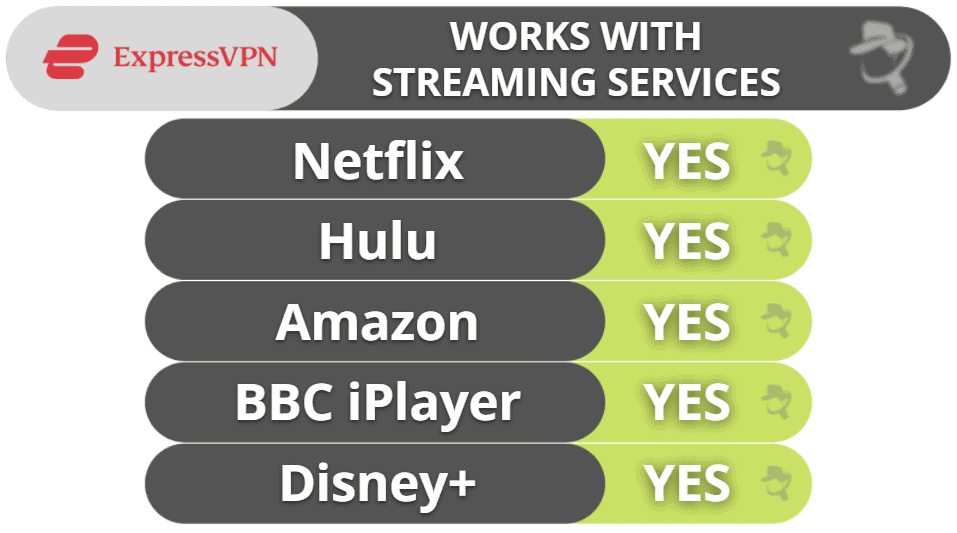
ExpressVPN is my top choice for streaming. It works with 100+ streaming services, including popular ones like Netflix, Amazon Prime, and Disney+ and their different libraries. It can safely access Hulu, Max, and Apple TV+ from anywhere, as well as lesser-known services like Sling TV and Fubo.
Plus, ExpressVPN’s MediaStreamer feature allows you to stream in great quallity on devices that don’t support a VPN app, such as Roku, some smart TVs, and gaming consoles.
ExpressVPN Torrenting: Strong
ExpressVPN supports P2P file sharing and torrenting on each of its servers in 105 countries — this is in contrast to many other top VPNs, which only support torrenting on dedicated P2P servers. It also works with all of the top torrenting clients, including BitTorrent, uTorrent, Deluge, Vuze, and more (I had the fastest download speeds with BitTorrent).
You also don’t have to worry about your IP address leaking while torrenting — before I started to download any files, I ran a DNS, WebRTC, and IPv6 leak test in 20+ countries and never suffered a leak.
Its split-tunneling is very useful for torrenting — I often use it to send all P2P traffic through the VPN and have the rest of my apps use my regular internet connection, which increases my download speeds. Plus, ExpressVPN is one of the rare VPNs to provide split-tunneling for Mac devices. Private Internet Access, Surfshark, and TunnelBear are the only other VPNs on this list with split-tunneling for macOS.
The provider allows port forwarding, too, which lets you connect to more peers to get faster downloads. However, you can only enable the feature via ExpressVPN’s router app — luckily, it’s very simple to install and use.
ExpressVPN Gaming: Strong
ExpressVPN is the best VPN for gaming on the market. I tested it with Dota 2, Fortnite, PUBG, and Counter-Strike: Global Offensive on my PC and PS5 while connected to a server in my country (the US) and a distant server in Australia, and I always had a very smooth experience — on the distant server, I even maintained average ping and didn’t experience lag or random disconnects.
I also like how all of ExpressVPN’s servers come with protection against DDoS (distributed denial of service) attacks, which can force you offline — this way, even if a sore loser would try to DDoS you while you’re connected to ExpressVPN, they wouldn’t be able to do it.
If you’re looking to play on your gaming console, ExpressVPN has a dedicated router app that takes less than 10 minutes to set up — plus, the app is extremely intuitive and simple to navigate. Alternatively, you can get ExpressVPN’s own router, which comes with the VPN preinstalled (and even has passed an independent audit).
ExpressVPN supports various cloud gaming platforms, which are services that stream games to portable devices like smartphones and tablets. Specifically, it offers support for Google Stadia, GeForce Now, and PlayStation Now. During testing with a PlayStation Now account, the streaming quality using ExpressVPN was consistently smooth.
ExpressVPN Bypassing Network Restrictions: Strong
ExpressVPN has obfuscated servers that can help you access the free and open internet by getting around network firewalls.
Its obfuscated servers are located all over the world, so users in censor-heavy countries can find a server in a nearby country to get the fastest speeds. For example, users in Indonesia can connect to a server in Singapore.
ExpressVPN’s obfuscation also bypasses network restrictions at school and workplaces, giving you unrestricted access to social media, video platforms, and gaming sites that network administrators often block.
ExpressVPN Ease of Use

Whether you’re trying out a VPN for the first time or are an experienced user, you’ll have no problem navigating ExpressVPN’s intuitive interface. All essential features are automatically configured to their optimal settings, eliminating the need for manual adjustments. If you want to adjust them, you won’t feel lost, as all features come with brief but helpful explanations.
I particularly like that ExpressVPN divides its server locations into regions, so it took me less time to find the servers I was looking for. You can mark server locations as Favorites, which ExpressVPN keeps in a separate tab, or use the Recommended tab, where you’ll find a short list of server locations that are best for your current location.
On the mobile apps, I like how you can enable NAT Heartbeats in Lightway’s Advanced Options for faster notifications to your device, which is convenient if you use weak public Wi-Fi connections or switch networks often.
Plus, ExpressVPN lets you set it up so it automatically connects you to the last server location you used, and there’s an option to auto-launch the app on the desktop. On mobile, it similarly connects you to the last used server location when the device starts up and when you join networks that you haven’t listed as trusted. This means you can configure it to protect your traffic even if you forget to manually connect to it.
ExpressVPN Plans + Pricing
ExpressVPN offers a monthly plan, an annual plan, and a 2-year deal. Although it’s a little more expensive than some providers on this list, it has the best performance with excellent security, speed, and privacy features (and also its strong streaming capabilities). The good thing is you can get 80% off the 2-year deal, so it’s just $2.49 / month. Plus, you’ll get up to 5 GB of free eSIM data from holiday.com.
ExpressVPN accepts payment in many forms, including different credit cards, PayPal, Bitcoin, and various online banking services. There is a no-questions-asked 30-day money-back guarantee with each purchase.
Read the full ExpressVPN review >
🥈2. Private Internet Access (PIA) — Flexible, Fast + Highly Versatile Great for Torrenting & Streaming

6-month plan: $7.50 / month
1-month plan: $11.95 / month
Private Internet Access (PIA) has excellent torrenting and streaming support, as well as great speeds. It supports P2P traffic on all servers, works with all of the top torrent clients, and also has port forwarding, which allows you to connect directly to peers to get faster downloading speeds. It offers SOCKS5 proxy servers, too, which change your IP address but don’t encrypt your traffic, providing much faster torrenting speeds.
- Great VPN ad blocker
- Optimized streaming servers
- SOCKS5 proxies & port forwarding
- Excellent US server network
- Live chat isn’t always helpful
- Limited number of obfuscated servers
It works with all of the most popular streaming services, like Netflix, Hulu, Disney+, and many others, and we experienced no lag or buffering in our speed tests.
When it comes to server locations, PIA has servers in 50 countries, including in all 50 states in the US. This means US users can connect to a server in their state to receive the best speeds.
Plus, I like that its apps are customizable — this allows you to configure your VPN connections for different networks, so you can get maximum performance in most circumstances. The provider allows unlimited connections, too, meaning you can install and use its apps on as many compatible devices as you want.

My favorite thing about PIA is its strong commitment to user privacy — while most VPNs claim they don’t log user data (but can’t really back up that claim), Private Internet Access’s claims of not logging user data have been proven true, both in an independent audit and multiple court cases. PIA even releases regular transparency reports showing how it doesn’t produce logs to investigators, and its apps are fully open source.
The VPN also has great extras. For example, split-tunneling is available on Android, Windows, Macs, and Linux, and you can exclude apps and website IP addresses (ExpressVPN only lets you exclude apps).
PIA also has a very good and user-friendly ad blocker (PIA MACE), which operates at the DNS level to reduce ads, trackers, and connections to known malicious domains when you’re connected through the VPN. Plus, it comes with a great breach monitoring tool, called Identity Guard, which checks if your email address, or any personal information related to it, has been compromised in a data breach and alerts you if your email is leaked.

Private Internet Access Security Facts
- Protocols: OpenVPN, WireGuard, IKEv2/IPSec (iOS only)
- Data encryption: 128-bit AES, 256-bit AES
- Specialty servers: Obfuscated, SOCKS5, streaming, dedicated IPs
- Leak protection: DNS, WebRTC, IPv6
- Kill switch: Yes
- No-logs policy: Yes
- RAM-only servers: Yes
- Perfect forward secrecy: Yes
Private Internet Access Speed Tests
PIA lists the latency for every server on its network, helping you pick the fastest server. We chose the server with the lowest latency when we tested PIA’s connection speed in each country.
Here are some highlights:
PIA’s speed decreased by only 6% on the fastest servers. However, when we connected to some of its servers in Asia and South America, the speed dropped by about 40%, which is still way above average. Overall, PIA slowed down our internet connection by only 22%, which is better than most competitors.
Private Internet Access Streaming: Strong
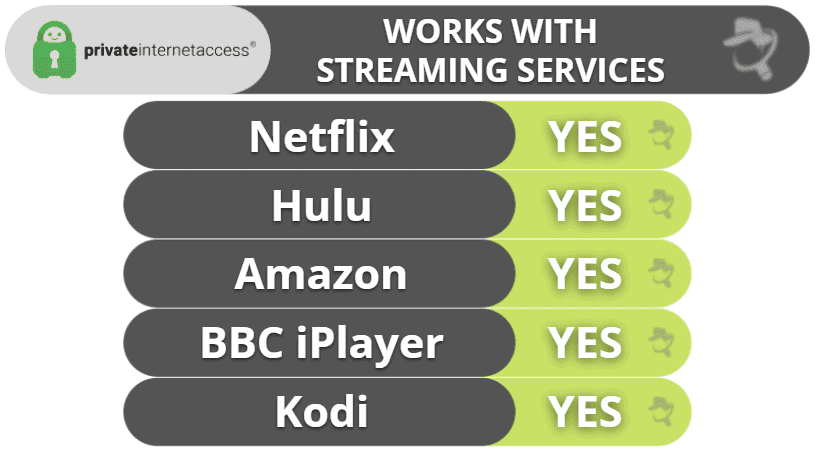
PIA is excellent for streaming. It has optimized streaming servers in 15+ countries (including the US, the UK, Italy, and Japan) that work with Netflix, Disney+, Amazon Prime, Apple TV, and BBC iPlayer. PIA’s servers are also compatible with local streaming services in different countries like RaiPlay (Italy), Crunchyroll (US), and Ruutu (Finland).
I like that PIA comes with Smart DNS, which can provide HD access to popular streaming services’ libraries on devices that don’t have a VPN app (it’s very similar to ExpressVPN’s MediaStreamer).
Private Internet Access Torrenting: Strong
Like ExpressVPN, PIA allows torrenting on every single server in 50 countries, so you don’t have to search for or connect to a dedicated P2P server like you do with some other VPNs (PIA is one of my favorite torrenting VPNs). I tested random PIA servers all over the world with uTorrent and BitTorrent, and I had no problems sharing files with either torrent client.
I also like PIA’s SOCKS5 multi-hop tool that routes your connection through a proxy server, which can slightly increase your torrenting speeds. Plus, it’s great how PIA comes with port forwarding — it’s just a shame that, it doesn’t support port forwarding on its US servers.
I put PIA through a number of DNS leak tests, and it passed each one with 0 leaks. I also really like that PIA automatically disables IPv6 traffic — I didn’t have to worry about manually disabling it (like I did with VyprVPN).
Private Internet Access Gaming: Mostly Strong
PIA is among the best gaming VPNs in 2026, as it provides very strong security and fast connections — in our tests, the ping never changed while gaming on a local VPN server. And even though we had slightly higher ping than we did with ExpressVPN while gaming on a distant VPN server, the gameplay was still smooth.
PIA’s servers come with DDoS protection to keep you safe while having fun with your favorite games. Plus, you can game on your Xbox or PlayStation console with PIA if you connect the VPN to your router. That said, PIA lacks a native router app (unlike ExpressVPN), so you’ll need to perform a manual setup — fortunately, PIA provides access to step-by-step tutorials that show you what you need to do.
PIA doesn’t mention if it provides support for cloud gaming — I reached out to customer support, and the reps told me they can’t guarantee PIA will work with cloud gaming platforms. In my tests, it worked pretty well, but I can’t promise that it will also work for you. If you are mainly interested in using a VPN for cloud gaming, I recommend checking out ExpressVPN instead because it provides support for many cloud gaming platforms.
Private Internet Access Bypassing Network Restrictions: Strong
PIA uses the Shadowsocks protocol and the Multi-Hop feature to get around firewalls. The protocol hides the fact that you’re using a VPN so you can freely visit any site that blocks VPN traffic on restricted networks, like at school or work.
Shadowsocks is easy to find (it’s listed under Proxy in the Settings menu), and it requires just one click to enable it. PIA gives you the option to connect to one of 7 different countries (choose the one closest to your location), like the US, Japan, or Israel, to “hop” around a firewall.
Private Internet Access Ease of Use
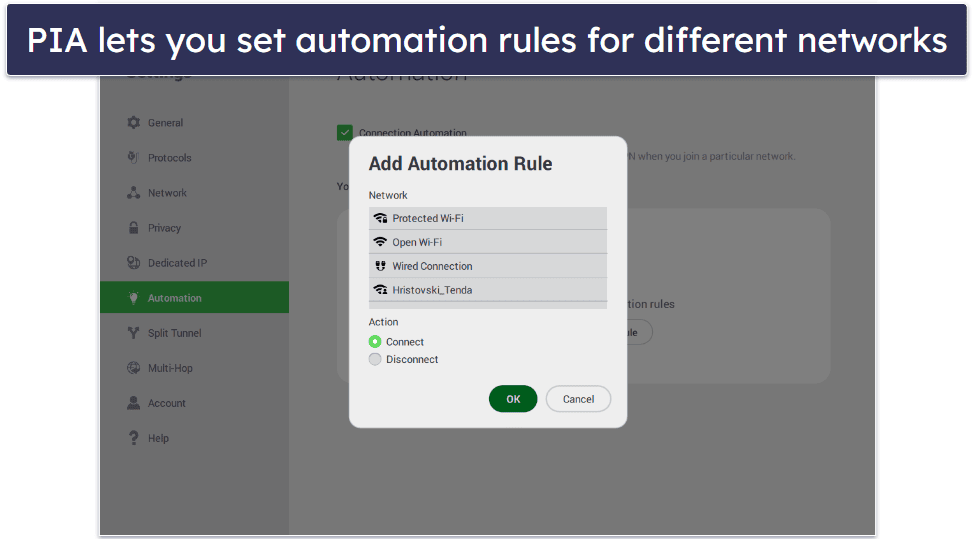
PIA has the most flexible and customizable apps out of any VPN on this list. For example, it lets you choose between different levels of encryption, change local port connections, and allows you to move around the sections on the main dashboard so the most important features are at the very top.
It’s super convenient that the main window lists the last 6 server locations you used, which means you don’t have to manually search for them every time in the server list. Other handy tools include the tab with 1-click links to features like the ad blocker PIA MACE and port forwarding, a separate tab for all the servers you marked as a favorite on the main dashboard (on mobile), and there’s a Snooze option that lets you pause the VPN connection after a set amount of time.
I also found PIA’s automation rules very handy. The app allows you to connect to a server whenever you join an unsafe public Wi-Fi network and disconnect when it detects you’re using your home Wi-Fi network.
Private Internet Access Plans + Pricing
PIA is one of the cheapest VPNs out there, with deals starting at just $1.33 / month. It also offers add-ons like an antivirus and a dedicated IP address.
PIA accepts credit cards, PayPal, and cryptocurrencies like Bitcoin, Ethereum, and Litecoin. I also like how you can pay with Amazon Pay. PIA covers each purchase with a 30-day money-back guarantee.
Read the full Private Internet Access review >
Editor's Note: Private Internet Access and this site are in the same ownership group.
🥉3. CyberGhost VPN — High Performance Optimized Servers for Gaming With Good Automation

6-month plan: $6.99 / month
1-month plan: $12.99 / month
CyberGhost VPN is a good pick for gaming, as it comes with dedicated gaming servers in 4 countries (the US, the UK, Germany, and France). These servers are optimized to provide stable ping and smooth connections — in our tests, we always enjoyed fast gaming sessions when playing Dota 2 and Counter-Strike: Global Offensive.
- Dedicated P2P & gaming servers
- Works with 50+ streaming apps
- Ultra-secure servers (NoSpy servers)
- Convenient automation rules
- Doesn’t work in China
- Speeds aren’t always fast
Its regular servers, which span 100 countries, work reliably, too. The server menus and features make it easy to find a nearby server location for the fastest possible connections. Plus, you can connect up to 7 devices at the same time.
In addition, CyberGhost VPN has really good streaming support, as it has dedicated streaming servers that are optimized for specific streaming platforms. These include Netflix, Amazon Prime, Apple TV+, and Disney+, as well as CBC, France TV, Rai Play, DAZN, and ITV.
It also provides great P2P support since it has P2P servers in 85+ countries. It’s a shame it doesn’t allow torrenting on all servers like ExpressVPN and Private Internet Access, but its P2P server network is still larger than most competitors.
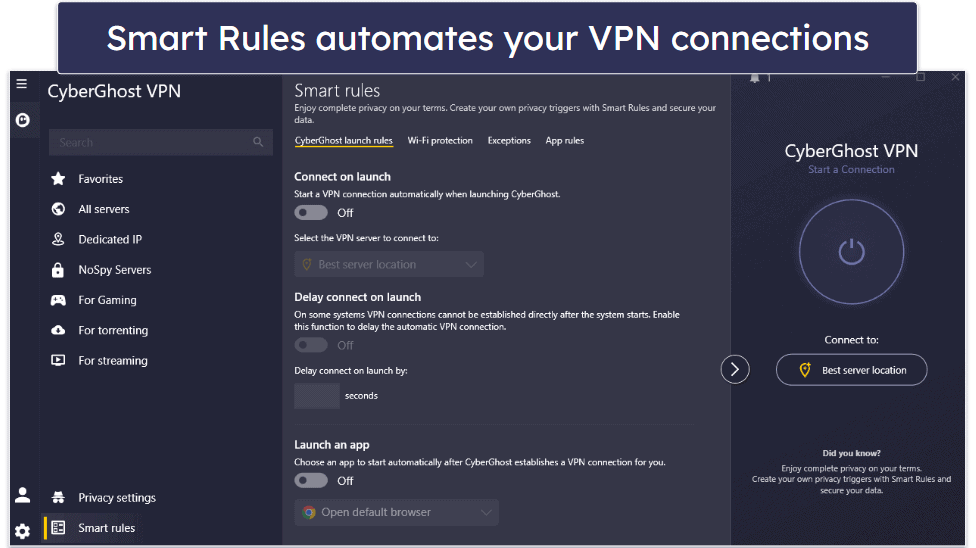
I love CyberGhost VPN’s Smart Rules feature, which is available on desktop and allows you to automate VPN connection preferences and Wi-Fi protection rules and choose which websites are routed through the VPN tunnel. For example, you can use Smart Rules to make the VPN app automatically connect to a specific streaming server and open a streaming app on launch. Or you can configure CyberGhost VPN to automatically connect to the fastest server when you open a specific app, like a gaming client.
This VPN provides really strong security features — it has NoSpy servers, which provide extra security and privacy, as only the provider’s staff has access to them. There’s also Content Blocker, which protects you from malicious sites, though it can’t get rid of ads as well as Private Internet Access’s PIA MACE.
CyberGhost VPN Security Facts
- Protocols: OpenVPN, IKEv2/IPSec, WireGuard
- Data encryption: 256-bit AES
- Specialty servers: NoSpy, P2P, streaming, gaming, dedicated IPs
- Leak protection: DNS, IPv6
- Kill switch: Yes
- No-logs policy: Yes
- RAM-only servers: Yes
- Perfect forward secrecy: Yes
CyberGhost VPN Speed Tests
CyberGhost VPN has servers in 100 countries — more than most other VPN providers. We tested CyberGhost’s connection speed on multiple servers.
Here are some highlights:
CyberGhost isn’t the absolute fastest VPN on the market, as it reduced our connection speeds by an average of 32%. However, this is better than a lot of competitors, so it’s not the worst. And we were still able to play games without any lag on each server we tried, even the most distant ones.
CyberGhost VPN Streaming: Strong
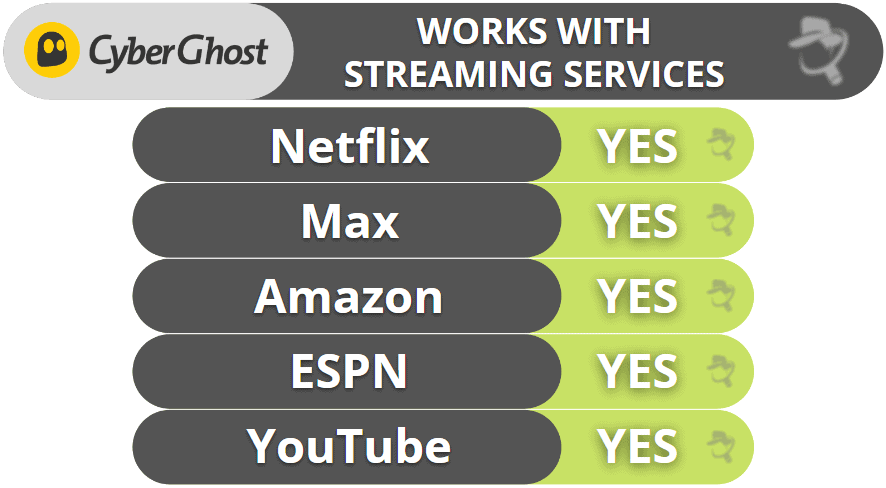
CyberGhost VPN has 100+ streaming servers in 20+ countries optimized to access and offer great speeds for 50+ streaming services. For example, there’s a specific US server for Hulu and a separate US server that works with Amazon Prime. Likewise, there’s a UK server optimized for Netflix UK (there are dedicated Netflix servers in 15+ countries), and so on.
CyberGhost VPN Torrenting: Strong
CyberGhost allows torrenting on servers in 85+ countries all over the world, so you’ll be able to find a P2P server near your location with fast speeds no matter where you’re located. I also really like that it shows how far the P2P servers are from you — just select the closest server to get the fastest download speeds.
CyberGhost VPN Gaming: Mostly Strong
I really like that CyberGhost VPN provides access to 90+ dedicated gaming servers in 4 countries (the US, the UK, Germany, and France) and that they’re optimized to provide stable and fast multiplayer experiences. When we played a game of Dota 2 using the German gaming server, the ping was in the 108–112 ms range, which is slightly lower than it was when we used a regular German server.

All of CyberGhost’s servers come with anti-DDoS protection. Also, you can set up the VPN on your router by following the provider’s tutorials (which are helpful and even include screenshots) — but I think it’s more convenient to use ExpressVPN on your router, as it comes with a dedicated router app that’s very simple to set up and use.
Similar to PIA, I also asked CyberGhost’s reps if the VPN is compatible with cloud gaming platforms, and they unfortunately said they can’t guarantee it will work. It worked with cloud gaming platforms in my tests, but keep in mind there’s a chance it might not work for you.
CyberGhost VPN Bypassing Network Restrictions: Weak
Unlike ExpressVPN and Private Internet Access, CyberGhost doesn’t have obfuscated servers, which means it can’t get around tough network restrictions. It’ll still be able to bypass milder firewalls and blocks on restricted networks at work or school — unless they’re specifically blocking VPN traffic.
CyberGhost VPN Ease of Use
CyberGhost VPN has beginner-friendly and modern apps for all major operating systems. You can quickly connect to the best server available with 1 click or choose from a list of specialized servers for streaming, gaming, torrenting, and more. It even separates its optimized servers from its regular servers in the Favorites tab, too, which makes it even easier to find and connect to the server you’re looking for in the app.

CyberGhost’s settings and features are clearly labeled, making it easy for you to customize your VPN connection. There are options to set launch rules, too, through its Smart Rules feature — for example, you can decide what server the app connects you to on launch and what app CyberGhost VPN should launch after you connect to a certain server.
On top of that, CyberGhost includes Wi-Fi protection rules that let you decide whether to connect to a server when the VPN detects a certain type of network (like unsecured public Wi-Fi networks). Finally, CyberGhost allows you to automatically connect to the VPN when you open certain apps.
CyberGhost VPN Plans + Pricing
CyberGhost VPN offers several payment options, including a 2-year offer that’s one of the best deals out there ($1.59 / month). The monthly plan is backed by a 14-day money-back guarantee, whereas the long-term deals include a very generous 45-day money-back guarantee. CyberGhost accepts payment with credit cards, PayPal, and Bitcoin.
Read the full CyberGhost VPN review >
Editor's Note: CyberGhost and this site are in the same ownership group.
4. NordVPN — Feature-Rich With Fast Speeds on All Servers

Plus 24-month plan: $3.59 / month
Complete 24-month plan: $3.99 / month
Prime 24-month plan: $6.99 / month
NordVPN provides access to lots of extra features that keep you safe online. It has Threat Protection Pro, which is one of the best VPN ad blockers on the market — it gets rid of malicious ads, blocks connections to shady sites, and protects your device from malware-infected downloads. Even better, Threat Protection remains active even if you’re not connected to a VPN server.
- Fast proprietary NordLynx protocol
- Double VPN servers
- Malware scanner
- Set up a large private network
- 2 macOS apps
- Doesn’t work in restrictive countries
The VPN has its own protocol called NordLynx, which provides really fast speeds. In addition, NordLynx includes post-quantum encryption protections against future threats, similar to ExpressVPN’s Lightway. Also, it has servers in 149 countries, comes with split-tunneling, allows 10 connections, and has intuitive apps for all major platforms.
The provider is great for streaming and torrenting — it works with multiple popular streaming services like Netflix and BBC iPlayer and has P2P servers in 110+ countries. It also provides really good speeds for streaming, torrenting, and other online activities on all of its servers.
NordVPN is a good gaming VPN thanks to its Meshnet feature, which lets you link up to 60 devices over encrypted VPN connections — this helps you host virtual LAN parties securely.
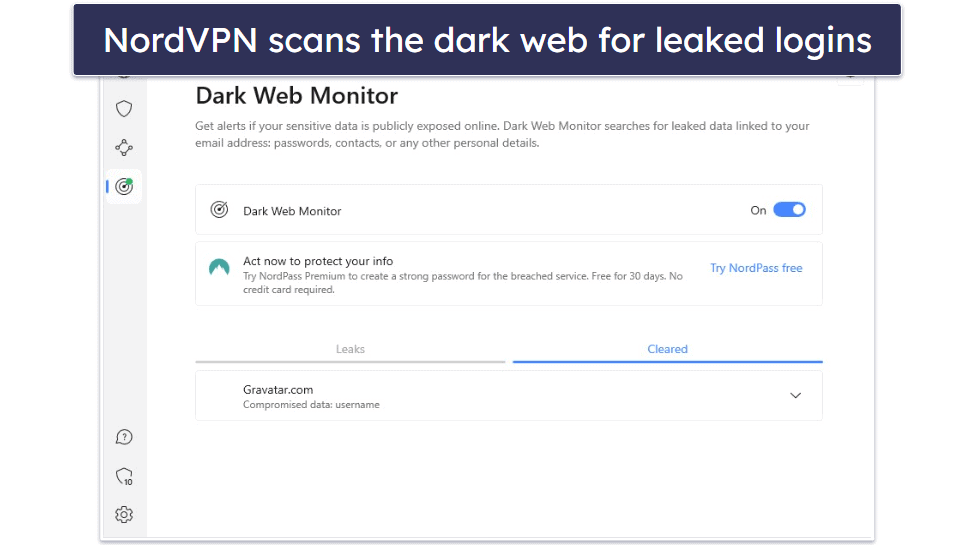
In addition, NordVPN is one of the only VPNs on the market to have a Dark Web Monitor, which scans the dark web and alerts you if the login associated with your NordVPN account has been leaked.
On top of that, NordVPN has Double VPN servers, which add an extra layer of encryption by sending your traffic through 2 VPN servers instead of 1, and it also has Onion Over VPN servers that let you browse the dark web from a regular browser like Chrome (you can only use the Tor Browser with most VPNs).
Finally, its strict no-logs policy has been independently audited (like ExpressVPN and Private Internet Access) and also proven true when one of the data centers that housed one of its servers suffered a data breach (and no user data was compromised).
NordVPN Security Facts
- Protocols: NordLynx, OpenVPN, IKEv2/IPSec
- Data encryption: 256-bit AES
- Specialty servers: Obfuscated, P2P, Double VPN, Onion over VPN, dedicated IPs
- Leak protection: DNS, WebRTC, IPv6
- Kill switch: Yes
- No-logs policy: Yes
- RAM-only servers: Yes
- Perfect forward secrecy: Yes
NordVPN Speed Tests
We tested multiple NordVPN servers, both nearby and long-distance, to see how its speeds compare to competitors.
Here are some highlights:
Overall, NordVPN performed really well in our tests. It showed a decrease of 12% on the nearest servers, which is still fast for uninterrupted browsing, streaming, and gaming. And on distant servers, we only experienced a 37% slowdown on average — we had fast speeds for all online activities, and only experienced minor slowdowns on some servers.
NordVPN Streaming: Strong
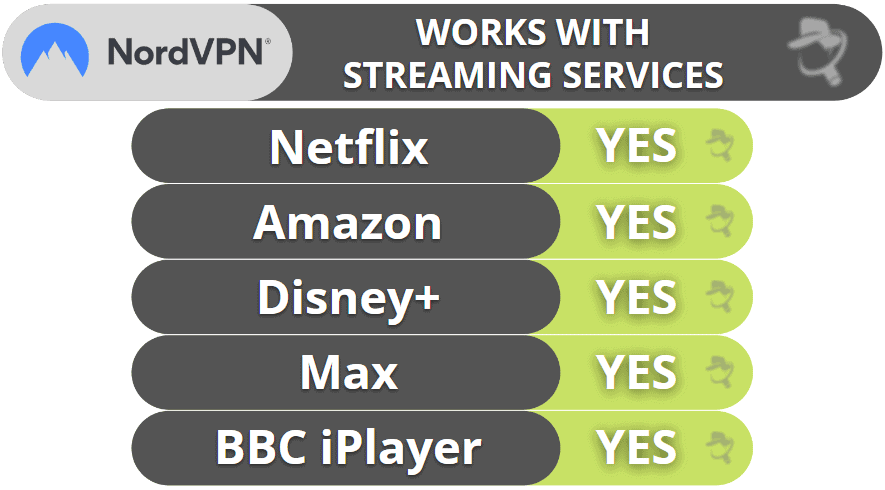
NordVPN works with many streaming services, including Netflix, Amazon Prime, Disney+, Max, and BBC iPlayer. The provider’s smart DNS also lets you stream on devices that don’t support VPNs, like certain smart TVs and gaming consoles.
NordVPN Torrenting: Strong
NordVPN allows torrenting on servers in 110+ countries, so you don’t risk torrenting on overcrowded servers that can slow down your speeds. I tested the provider with popular P2P apps like uTorrent and Vuze, and I never experienced any issues.
You also get SOCKS5 proxy servers in 3 countries (the US, the Netherlands, and Sweden).
Like ExpressVPN, NordVPN comes with full leak protection — I ran leak tests while connected to servers in 10+ countries before I started torrenting, and I never experienced any leaks.
I also like NordVPN’s Threat Protection feature — it can protect you from malicious P2P downloads, as it scans executable files that are up to 20 MB for malware. In addition, it can also get rid of annoying ads on P2P sites.

NordVPN Gaming Support: Strong
NordVPN offers excellent support for gaming. Our tests showed consistently smooth connection speeds, with stable and low ping on local servers. When gaming on distant servers, the ping remained stable and within an average range, and we experienced no dropped connections. Although we did notice minor lag when connected to distant servers, it was minimal and didn’t negatively impact the gaming experience.
The provider can prevent DDoS attacks against your IP address, but it doesn’t have an anti-DDoS feature that you can turn on/off. This means the VPN’s IP address is vulnerable, and a successful attack could disconnect you from the internet, but the changes of this are highly unlike. Even then, you can just connect to another server. It allows manual setups on many router models — it also has helpful tutorials that make the setup process pretty simple.
Unfortunately, NordVPN’s reps told me they can’t guarantee that the VPN will work with cloud gaming platforms — I didn’t experience any issues while using NordVPN on platforms like Google Stadia, but you might not have the same results as me.
That said, I really like NordVPN’s Meshnet feature — you can use it to host virtual LAN parties and secure your connection to your friends’ devices using VPN encryption. Plus, Meshnet uses the provider’s NordLynx protocol, which provides really fast speeds.
NordVPN Bypassing Network Restrictions: Weak
Unfortunately, NordVPN doesn’t work in some restrictive countries like Russia or Iran. That said, it’s a good pick for bypassing blocks on restrictive networks, like at school and work, since it offers obfuscated servers like some of its top competitors, like ExpressVPN and PIA.
NordVPN Ease of Use

NordVPN offers intuitive and sleek apps that are great for VPN beginners. It has a 1-click Quick Connect feature that instantly connects you to the best server, an option to auto-connect to a server every time you start your PC or connect to the internet on mobile, and the option to connect or disconnect from a server every time it detects a trusted network.
My favorite feature is the interactive map — it lets you click on any location on the map to connect to it, which is much faster than having to look for the server location on the list of servers.
I really like the app’s design. The server list is organized alphabetically, so you won’t feel overwhelmed with the number of choices, and I like how specialty servers are kept in separate tabs on the main page for easy access, just like in CyberGhost’s apps.
The settings are easy to spot and access, and all of them are clearly labeled, so you won’t spend too much time looking for what you need. Plus, each setting is accompanied by a brief explanation.
NordVPN Plans + Pricing
NordVPN has 4 tiers called Basic, Plus, Complete, and Prime.
The Basic plan starts at $3.49 / month and provides access to all of the provider’s VPN features. However, it only comes with Threat Protection, which is a scaled-back version of Threat Protection Pro. The former only blocks ads and malicious sites.
The Plus plan starts at $3.59 / month and adds Threat Protection Pro (malware protection and an ad and tracker blocker), a Data Breach Scanner, and NordPass, which is a pretty good password manager.
The Complete plan starts at $3.99 / month and adds NordLocker, which provides 1 TB of encrypted cloud storage. For US users, the Prime plan (starting at $6.99 / month) adds protection against identity theft and cyber extortion.
NordVPN accepts several payment methods, including credit/debit cards, PayPal, Amazon Pay, Google Pay, and major cryptocurrencies. It also backs each purchase with a 30-day money-back guarantee.
Read the full NordVPN review >
5. Surfshark — Super Affordable VPN

One 24-month plan: $2.49 / month
One+ 24-month plan: $4.19 / month
Surfshark is one of the most affordable VPNs on the market, with plans starting at only $1.99 / month — so it’s also a good pick if you’re on a tight budget. Plus, its apps are super easy to use, and you get unlimited connections.
- Works with 50+ streaming apps
- Dynamic MultiHop servers
- IP Rotator feature
- Alternative ID privacy tool
- Slow on distant servers
- No built-in WebRTC & IPv6 protection
Surfshark supports P2P downloads on servers in 49+ countries, and the VPN works with top sites like Netflix, Max, and BBC iPlayer.
I like its Override GPS Location feature on Android. This cool feature matches your GPS data to the VPN-assigned IP address to prevent mobile streaming apps from detecting the VPN connection.

Surfshark has a great split-tunneling tool that’s available on almost all devices, including iOS and macOS, which is pretty uncommon. And like Private Internet Access, you can split-tunnel apps and websites for even greater flexibility.
Surfshark’s unique Alternative ID feature will create an alternate online persona — it hides your real email address, and you can mask your gender, age, birthdate, mailing address, and country. If you value your online privacy, this is perfect for signing up on shopping or other websites where you don’t want to provide your personal details. Alternative ID then automatically and anonymously forwards emails from the fake address it creates to your real email address.
Surfshark comes with robust security features, including CleanWeb, which is a really good ad blocker — in my tests, it got rid of most ads on media outlets, though it wasn’t always able to block pop-up ads (like Private Internet Access’s PIA MACE and NordVPN’s Threat Protection). On the plus side, it always prevented me from connecting to shady HTTP websites.

In addition, Surfshark provides double VPN connections for added security, and IP Rotator, which regularly changes your IP address to make it harder for someone to track your location.
Surfshark Security Facts
- Protocols: WireGuard, OpenVPN, IKEv2/IPSec
- Data encryption: 256-bit AES
- Specialty servers: Dynamic MultiHop (double VPN), P2P servers, dedicated IPs
- Leak protection: DNS
- Kill switch: Yes
- No-logs policy: Yes
- RAM-only servers: Yes
- Perfect forward secrecy: Yes
Surfshark Speed Tests
We ran a speed test on a random server from some of Surfshark’s countries to see what the average VPN speeds were.
Here are some of the highlights:
Overall, Surfshark provided good speeds on almost all servers we tested. It decreased our speeds by around 13% on the closest servers. And while we also experienced very noticeable slowdowns (84% on average), it was only on very remote servers.
Surfshark Streaming: Mostly Strong
Surfshark is a pretty good streaming VPN since it works with most popular streaming services, including different Netflix, Amazon Prime, and Max libraries, as well as BBC iPlayer. The provider also has a smart DNS, which you can use to visit streaming services (only from the US) on devices that don’t support VPNs.

Surfshark Torrenting: Mostly Strong
Surfshark provides good torrenting support on servers in 49+ countries. I also tested it with popular P2P clients like qBittorrent and Vuze, and it worked without any issues. That said, I think it’s a shame that the provider is missing other P2P-related features, such as port forwarding.
I also ran leak tests before I started torrenting, and I didn’t experience any leaks with Surfshark — despite it not having full leak protection like ExpressVPN and Private Internet Access.
Plus, I like how its CleanWeb feature protects you from malicious P2P sites — in addition, it can get rid of most ads on torrent trackers.
Surfshark Gaming Support: Mostly Strong
Surfshark is pretty good for gaming, as it always maintained good speeds on nearby servers — my ping was always really low and stable. That said, I experienced high ping and also lag while gaming on distant servers, which sometimes got in the way of my gaming.
The provider also comes with anti-DDoS protection and supports setups on several router models.
Surfshark doesn’t guarantee its service will work with cloud gaming platforms — it did in my tests, but I can’t promise you’ll have the same results.
Surfshark Bypassing Network Restrictions: Weak
Surfshark doesn’t work in restrictive countries like Russia, Iran, and Indonesia, but it does work on restricted networks where admins block sites for streaming, torrenting, and gaming.
Surfshark Ease of Use
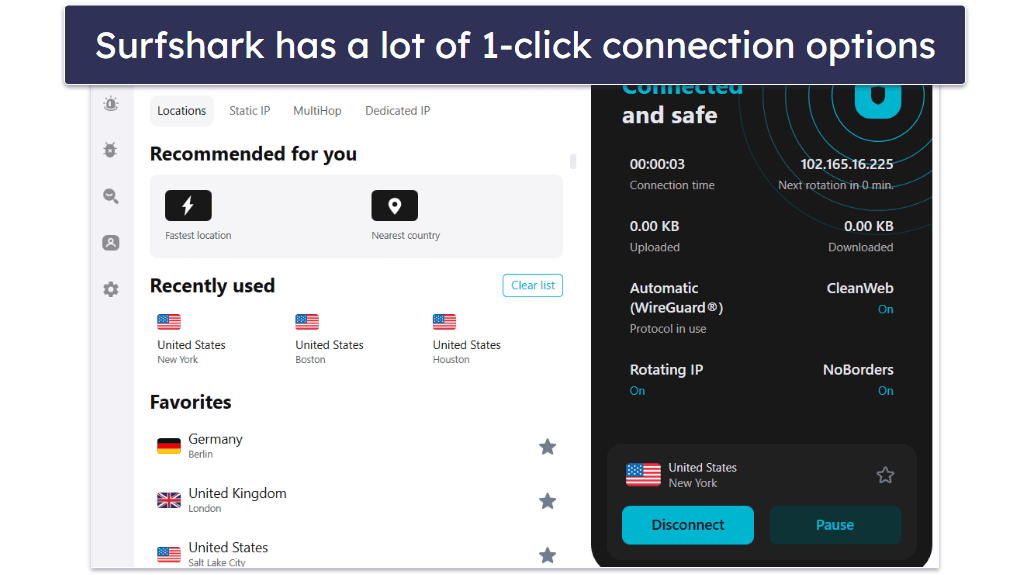
Surfshark’s apps are very intuitive. Whether you’re on a desktop or mobile device, the VPN is easy to navigate — all of the servers are listed on the main dashboard, and you can quickly find the server you’re looking for via the search function. You also have the option to mark servers as Favorites (like in the ExpressVPN app). The difference here is that Surfshark adds favorites at the top of the server list rather than in a separate tab, allowing for quick access and enabling you to see each server’s load time and latency.
I really like the convenient auto-connection options. Surfshark lets you connect to the Fastest Location or the Nearest Country with 1 click and has a separate Quick-connect button that’s customizable — it allows you to choose a server to connect to when you click on it.
The settings and features are intuitively laid out. Each feature has a short explanation attached to it, and enabling or disabling them only takes 1 click. There are even 1-click shortcuts to frequently-used features like IP rotator and CleanWeb on the main interface.
Surfshark Plans + Pricing
Surfshark has 3 tier-based, affordable paid plans. I think Surfshark Starter is enough for most VPN users, while its longest offer provides the best value since it starts at only $1.99 / month, which is super cheap, and it often includes additional months. The provider accepts several payment methods, including credit/debit cards, PayPal, Google Pay, Amazon Pay, and cryptocurrencies. Plus, it backs each purchase with a 30-day money-back guarantee.
Read the full Surfshark review >
6. PrivateVPN — Good VPN for Streaming
3-month plan: $6.00 / month
1-month plan: $11.99 / month
PrivateVPN is fast, secure, and has good streaming support. It can access 20+ streaming sites, including Netflix, Hulu, and Amazon Prime. It also supports torrenting on all of its servers, and it works with all popular torrenting clients. It allows 10 simultaneous connections.
- Works in censorship-heavy countries
- Minimalistic apps
- Works with 10+ Netflix libraries
- Budget-friendly plans
- Small server network
- No built-in WireGuard protocol

PrivateVPN also includes extra features like obfuscation for getting around VPN blocks and online restrictions in countries that censor the internet, and Tor support. Unlike top competitors like ExpressVPN and Private Internet Access, PrivateVPN doesn’t have split-tunneling.
PrivateVPN Security Facts
- Protocols: OpenVPN UDP/TCP, IKEv2/IPSec, L2PT/IPSec, PPTP, SOCKS5, WireGuard
- Data encryption: 256-bit AES
- Specialty servers: Obfuscated, Tor over VPN
- Leak protection: DNS, IPv6
- Kill switch: Yes
- No-logs policy: Yes
- RAM-only servers: Yes
- Perfect forward secrecy: Yes
PrivateVPN Speed Tests
We tested multiple nearby and faraway servers and measured how much each server slowed down our baseline connection. We connected to each server in the desired country almost instantly.
Here are some highlights:
PrivateVPN has really good speeds (especially the L2PT/IPSec protocol), and during our testing, no server’s download speed dropped below 50% (the general metric for a high-quality overseas connection). It has WireGuard, but you have to manually configure it on your device. The process took me less than 10 minutes, but it’s not very user-friendly and could be intimidating for less-experienced people. Instead, I prefer VPNs that include WireGuard as an in-app protocol (like Private Internet Access and CyberGhost VPN).
Our speed tests show that PrivateVPN is very capable of streaming, downloading, and video calling. There was little slowdown in nearby connections, and there was only some slowdown in overseas connections.
PrivateVPN Streaming: Strong
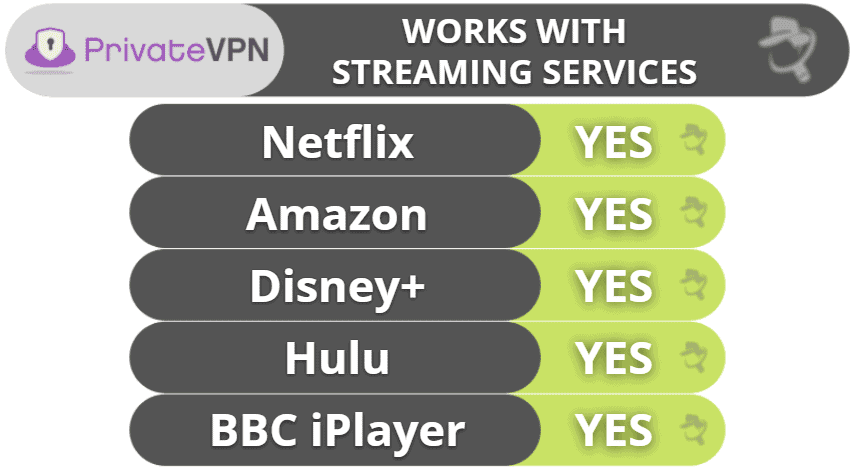
PrivateVPN works with top streaming services, like Netflix, Hulu, Amazon Prime, BBC iPlayer, and Disney+. It can also access their different catalogues, including 10+ different Netflix libraries.
PrivateVPN Torrenting: Strong
PrivateVPN supports torrenting on all of its servers (like ExpressVPN). I tested random servers with all of the major torrenting clients — uTorrent, BitTorrent, Bitport.io, and several more — and PrivateVPN was fully capable of downloading and sharing content from all of these clients.
I also ran PrivateVPN through a series of 10 DNS leak tests, and there were none.
PrivateVPN Gaming: Mostly Strong
When I tested PrivateVPN with online games like Fortnite and Counter-Strike: Global Offensive, it provided me with a really good multiplayer experience — I had good ping values on both local and distant VPN servers, so my games never lagged or stuttered. I also like that I was never disconnected from the gaming server.
All of PrivateVPN’s servers come with anti-DDoS protection, and the provider also has easy-to-follow setup guides that show you how to configure the VPN on your router.
Unfortunately, PrivateVPN doesn’t guarantee that its service will work with cloud gaming platforms — I tested it with Google Stadia and GeForce Now over the course of a day, and it worked only 70% of the time.
PrivateVPN Bypassing Network Restrictions: Strong
PrivateVPN has a Stealth Mode feature, which is an obfuscation tool that masks your VPN traffic, so it’s pretty good at overcoming internet censorship. It also bypasses filters and blocks on restricted networks.
PrivateVPN Ease of Use
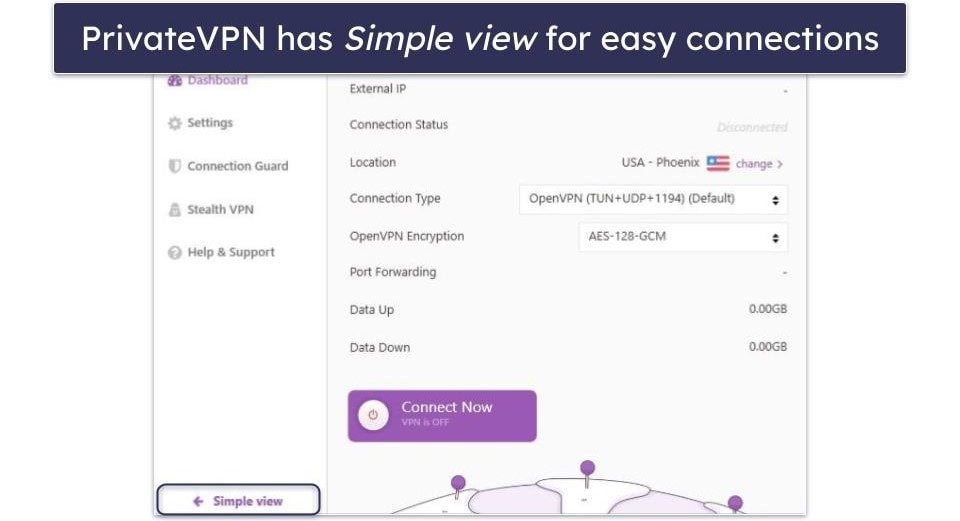
PrivateVPN’s apps are very easy to get used to. The VPN doesn’t have a ton of settings and features to enable or disable, so you’re unlikely to get overwhelmed. The home screen is very intuitive on both desktop and mobile, and I like how you can connect to the fastest server for your location with 1 click.
My favorite part about the desktop apps is that they come with 2 viewing modes: Simple view and Advanced view. Simple view is great for beginners — it shows only the connect button and provides access to the server list, so it’s great if you just want to connect to a server and forget about the VPN. Advanced view allows you to change settings, making it great if you want to customize your VPN connections. That said, Private Internet Access offers a lot more settings and features to customize.
Since it’s beginner-friendly, every setting and feature includes a short explanation, and there’s an auto-connect option that connects you to a server when you turn on your device, making sure you’re always protected.
PrivateVPN Plans + Pricing
PrivateVPN’s multi-year deal is one of the cheapest on this list — it costs only $2.00 / month, which is lower than most competitors. The VPN accepts 7 different credit cards (including JCB and Diners Club International), PayPal, and 2 cryptocurrencies. Each payment plan is backed by a 30-day money-back guarantee.
Read the full PrivateVPN review >
7. Proton VPN — Convenient Connection Features & Fast Speeds

12-month plan: $3.49 / month
1-month plan: $4.99 / month
Proton VPN is a fast and intuitive VPN developed by the same team that made the encrypted email service Proton Mail. Its apps offer lots of 1-click connections, and it has excellent speeds — plus a unique Accelerator feature that increases speeds by up to 40% on distant servers.
- Speed-boosting tool
- Specialized servers for Tor
- Free plan with unlimited data
- No smart DNS tool
- Doesn’t work in restrictive countries
In terms of streaming, Proton VPN can access 50+ streaming services, including popular platforms like Netflix and Hulu. It also supports torrenting in all but a few countries.
Proton VPN provides access to Tor over VPN connections, allowing you to browse .onion sites in your regular browser while keeping your IP address hidden from any Tor node.

Its parent company also developed Proton Pass, a really good password manager with both a free and paid version. It comes with essential features like auto-filling, end-to-end encryption, and password generation. Also, it provides helpful extras like email aliases, which help you prevent your real email address from being disclosed or leaked.
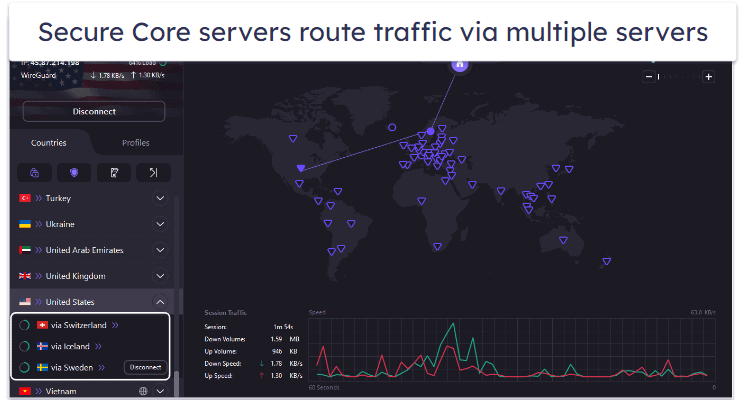
Proton VPN also has Secure Core VPN architecture that bounces user traffic through multiple servers (which are located in underground bunkers and data centers in Switzerland, Iceland, and Sweden) before the data leaves Proton VPN’s network.
Proton VPN Security Facts
- Protocols: OpenVPN, IKEv2/IPSec, WireGuard, Stealth
- Data encryption: 256-bit AES
- Specialty servers: Secure Core, P2P, streaming, Tor over VPN
- Leak protection: DNS, WebRTC, IPv6
- Kill switch: Yes
- No-logs policy: Yes
- RAM-only servers: No
- Perfect forward secrecy: Yes
Proton VPN Speed Tests
As with the other VPNs, we also tested multiple Proton VPN servers to see how it’s speeds compare to competitors.
Here are some highlights:
Proton VPN’s speeds were pretty fast in our speed tests. While it reduced the download speeds by an average of 24% (a bit slower than ExpressVPN), we were still able to seamlessly browse the internet, stream videos, and make VoIP (Voice over Internet Protocol) calls even when connected to a distant server. Proton VPN also has VPN Accelerator, which is a feature that uses high-tech tools to reduce latency and increase speeds, especially on distant servers (our speeds increased by up to 40% on some servers).
Proton VPN Streaming: Strong
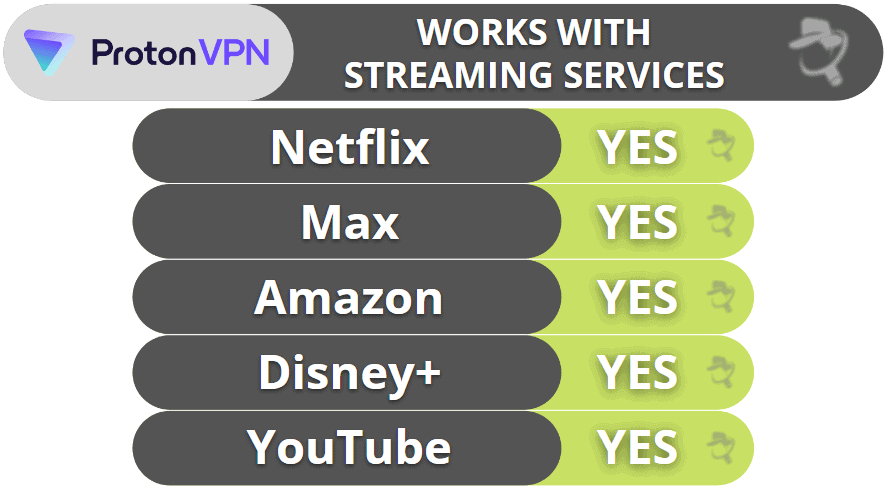
Proton VPN consistently works with 50+ streaming services, from popular ones like Netflix, Hulu, Apple TV+, and Max to less known platforms such as DAZN, Peacock, and Fubo.
Proton VPN Torrenting: Mostly Strong
Proton VPN supports torrenting but only on dedicated P2P servers in 110+ countries, so it’s pretty easy for most users to find a nearby server for optimal torrenting speeds. It will automatically redirect you to one of its dedicated P2P servers if it identifies P2P traffic. However, I prefer VPNs that allow torrenting on all servers, like ExpressVPN and Private Internet Access.
I conducted a DNS leak test on 10 of Proton VPN’s P2P servers — and there were 0 DNS leaks.
Proton VPN Gaming Support: Strong
Proton VPN is pretty good for gaming — I had very low ping and fast connections while connected to a local server. My ping was much higher when I switched to a distant server and I did experience some lag, but it wasn’t that noticeable, so I was still able to enjoy my gaming session. Plus, my connections to the gaming server never dropped.
All of Proton VPN’s servers have anti-DDoS protection. You can also manually set up Proton VPN on your router, and the provider has several helpful tutorials (which even include screenshots).
When I asked Proton VPN about cloud gaming support, the reps told me they couldn’t guarantee that Proton VPN would work with services like PlayStation Now and GeForce Now. In my tests, it worked without any issues, but you may not have the same experience.
Proton VPN Bypassing Network Restrictions: Weak
Unfortunately, Proton VPN doesn’t work in China and only maybe works in other restrictive countries — despite the VPN providing access to obfuscation. So it’s not a good option if you need to freely access the web in a restrictive country, but you can still use it to access restricted sites and content on networks at school and work.
Proton VPN Ease of Use
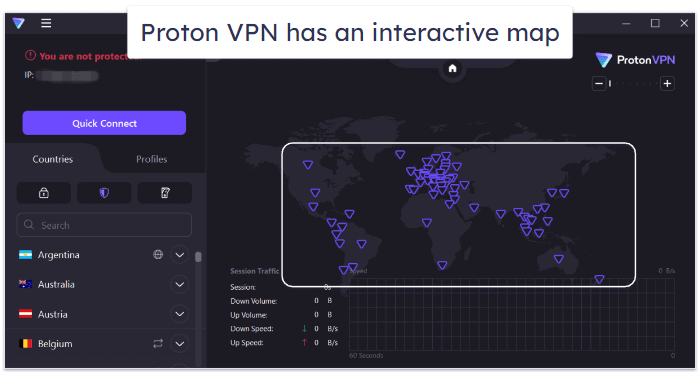
Proton VPN offers a user-friendly interface that’s suitable for both beginners and advanced users. All servers are listed on the home screen, and you can easily find and connect to the one you prefer via the search function.
All of Proton VPN’s main security settings are at the top of the server list for quick access, and there’s a Quick Connect feature that finds the fastest server available with 1 click. Advanced users will appreciate the detailed settings and customization options available, as well as all the connection details that Proton VPN shares on the main screen for each session.
Proton VPN lets you connect to specific servers, not just server locations like most other VPNs, and color codes server load, so you’ll easily find a server that’s not overcrowded. Plus, I think it’s very handy that it offers an interactive map like NordVPN — all you have to do is click on a server location, and Proton VPN will connect you to the fastest server in that location.
I found everything to be well organized in Proton VPN’s settings. Toggling features was pretty easy, especially since each came with a brief explanation. I also really like the Profiles feature, which allows you to create your own personalized connection preferences — from choosing a country to enabling specific features like Secure Core.
Proton VPN Plans + Pricing
Proton VPN’s free version is pretty good since it allows unlimited data. But it also has some limits — you can connect only 1 device, and it gives you access to servers in only 10 countries.
Proton VPN also has premium plans. Its long-term plans are pricier than other top VPNs’ long-term plans, but they still provide good value — I recommend the longest plan, which starts at $2.99 / month since it provides the best savings.
Proton VPN’s paid subscriptions are backed by a prorated 30-day money-back guarantee (prorated means you’re charged for each day of using the service until the 30-day deadline).
Read the full Proton VPN review >
8. TunnelBear — Good VPN for Beginners

12-month plan: $4.99 / month
1-month plan: $9.99 / month
TunnelBear is one of the most intuitive VPNs on the market — it’s very easy to use (even if you’ve never used a VPN before), and it has a really cute design (there are cute bears all over the app).
- User-friendly apps
- City-level server selection
- Works in restrictive countries
- No money-back guarantee
- No live chat support
It offers unlimited connections and is one of the only VPNs on this list to include split-tunneling on iOS, which allows you to exclude websites and even subdomains. Surfshark also has split-tunneling on iOS for websites.
TunnelBear also offers a great obfuscation feature (GhostBear) that works in restrictive countries. It also comes with a free ad blocker (for Chrome only). It’s pretty advanced, blocking browser fingerprinting, email tracking, and more.
TunnelBear Security Facts
- Protocols: OpenVPN, IKEv2, WireGuard
- Data encryption: 256-bit AES
- Specialty servers: Obfuscated
- Leak protection: DNS, WebRTC, IPv6
- Kill switch: Yes
- No-logs policy: Yes
- RAM-only servers: N/A
- Perfect forward secrecy: N/A
TunnelBear Speed Tests
TunnelBear has servers in only 47 countries — fewer than many premium competitors, including ExpressVPN, Private Internet Access, and CyberGhost VPN. However, its servers are spread out well across the globe in North, Central, and South America, Europe, and Australia, as well as in Singapore, Japan, and New Zealand. We connected to different servers to test TunnelBear’s speed.
Here are some highlights:
Overall, TunnelBear reduced our download speed by an average of 42%, which is still decent if your base speed is fast. When we connected to a local server (USA), the browsing speed remained almost the same as without a VPN, and we were able to stream video without any lag (and the upload speed jumped!). But the download and upload speeds significantly dropped when connected to distant servers in Japan, India, and Australia — it took up to 7 seconds for websites to load, and streaming content buffered for about 10 seconds before it began to play.
TunnelBear Streaming: Mostly Strong
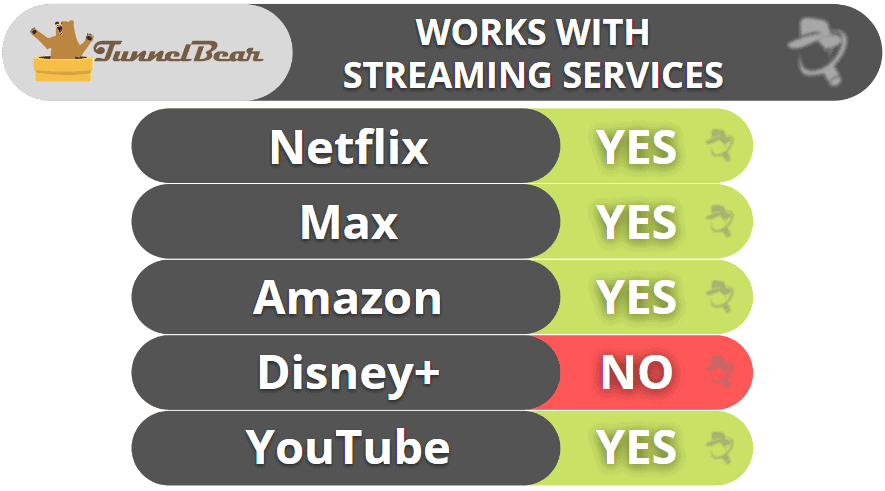
TunnelBear is a decent choice for streaming, though it doesn’t have excellent streaming support like ExpressVPN and CyberGhost. The VPN’s servers can safely access 5+ Netflix and Amazon Prime libraries, Hulu, BBC iPlayer, and less-known sites like Pluto TV and Crunchyroll. Unfortunately, TunnelBear doesn’t work with Disney+ and ESPN+.
TunnelBear Torrenting: Decent
TunnelBear doesn’t guarantee P2P support. However, it states file sharing isn’t blocked on its network. Torrenting is allowed in all 47 countries, though TunnelBear recommends picking a server in Canada, the US, the UK, Romania, the Netherlands, Germany, or Sweden for P2P traffic.
TunnelBear Gaming: Mostly Weak
TunnelBear is decent for gaming, as it provided me with good ping while connected to both local and distant servers. I did experience some lag, but it wasn’t very noticeable — plus, I like that my connections to the gaming servers never dropped. That said, if you’re looking for a gaming VPN with no lag, I recommend checking out ExpressVPN, Private Internet Access, or CyberGhost VPN instead.
While I like that TunnelBear comes with anti-DDoS protection on its servers, it’s a shame that it doesn’t offer support for routers (like ExpressVPN, Private Internet Access, and NordVPN do) — so you can’t use TunnelBear to play games on devices that don’t natively support VPNs, like an Xbox console or Nintendo Switch.
As with most of the other VPNs, TunnelBear’s customer support told me its service might work with cloud gaming platforms, but that it can’t guarantee that. When I used it with several cloud gaming services, it worked — but only 60% of the time.
TunnelBear Bypassing Network Restrictions: Strong
TunnelBear has an obfuscation tool (GhostBear) that you can enable with just one click. Like ExpressVPN and Private Internet Access, TunnelBear’s obfuscation tool is successful at overcoming internet restrictions and VPN blocks.
TunnelBear Ease of Use

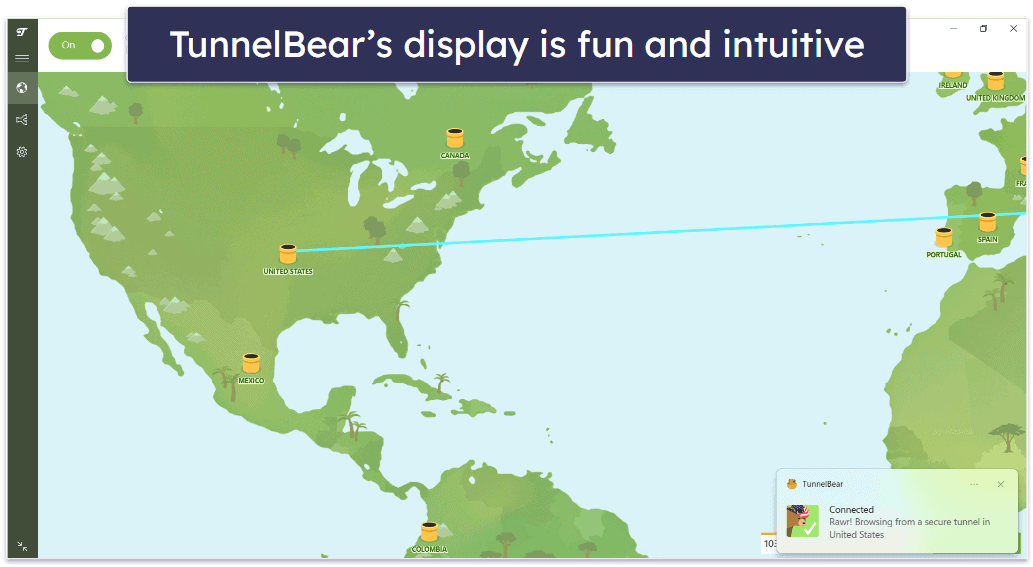
TunnelBear’s desktop and mobile apps are super simple and fun to use. When you connect to a server, the bear in the app digs a tunnel to that server location and pops out of the tunnel when it establishes a connection. On mobile, the bear roars when the app connects to the server and on desktop — the bear wears a hat that resembles that country.
All of its apps have a clear layout. You can access the full list of server locations by clicking on the drop-down arrow on the main screen and the settings by selecting the cogwheel on the left. The settings menu has a clear layout, which makes it very easy to navigate. Additionally, TunnelBear doesn’t have a whole lot of extra features, so you’re unlikely to feel lost when using the app on desktop or mobile.
There are some auto-connection features, but only on desktop — you can click on the interactive map to connect to a server location, set up the VPN to launch on startup, and receive an alert if an unsecured network is detected. For comparison, ExpressVPN and Private Internet Access’s apps let you set auto-connection rules on mobile, too.
TunnelBear Plans + Pricing
Unlike Proton VPN, which provides unlimited data for free users, TunnelBear’s free plan includes only 2 GB per month — this is good enough just to try out TunnelBear’s browsing speed (it’s not enough for streaming or torrenting).
All of the paid subscriptions include unlimited simultaneous connections. Starting at $4.17 / month, TunnelBear’s premium plans are worth it if you’re looking for a really simple and intuitive VPN. It also offers a Teams plan for businesses with 2 or more users.
TunnelBear accepts only Mastercard, Visa, and American Express for payment (no PayPal or cryptocurrencies), and according to the company’s website, you can also pay with jars of honey (but I didn’t test this!). TunnelBear doesn’t have a money-back guarantee.
Read the full TunnelBear review >
9. VyprVPN — Good for Getting Around Internet Restrictions (+ Top Choice for Small Businesses)

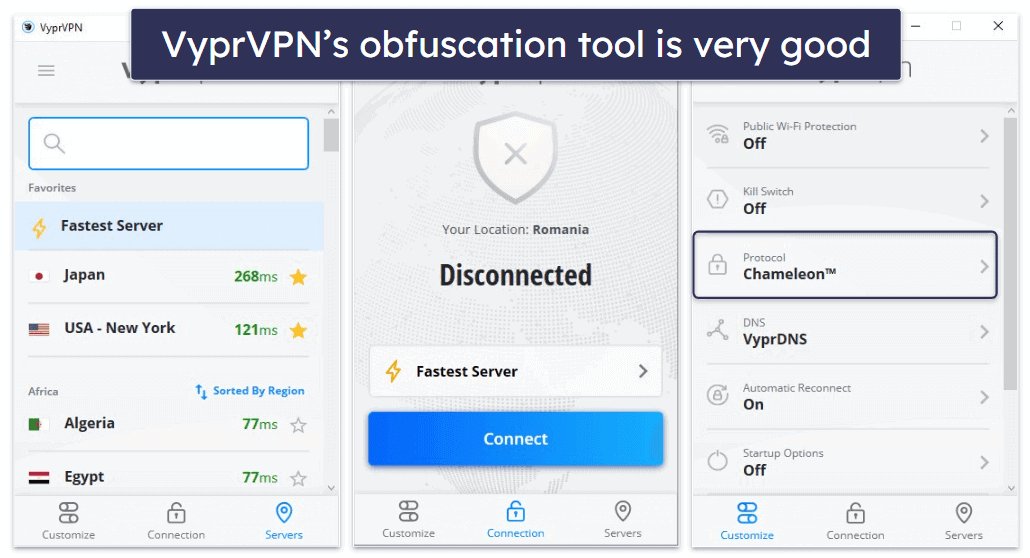
VyprVPN is excellent at getting around firewalls — it uses its proprietary Chameleon protocol to bypass VPN blocks — this protocol uses obfuscation to mask your VPN traffic and allow you to surf the internet without any restrictions.
- Obfuscation works in restrictive locations
- Customizable kill switch
- Blocks malicious sites
- Live chat isn’t helpful
- Only allows 5 connections
It’s also a pretty good choice for business users — it owns and operates all of its servers, it’s based in Switzerland (which has strict privacy laws), and it doesn’t keep logs of internet activity or files that you or your employees share.
VyprVPN Security Facts
- Protocols: WireGuard, IKEv2/IPSec, OpenVPN, Chameleon (obfuscation)
- Data encryption: 256-bit AES
- Specialty servers: None
- Leak protection: DNS
- Kill switch: Yes
- No-logs policy: Yes
- RAM-only servers: N/A
- Perfect forward secrecy: Yes
VyprVPN Speed Tests
VyprVPN has servers located in 70 countries across the world. We tested VyprVPN’s speed by choosing a server in some of VyprVPN’s locations.
Here are some highlights:
VyprVPN provided excellent speeds when we connected to servers in the US, in Europe, and even in distant locations like Japan and Australia. However, VyprVPN’s speed decreased more than I would have liked when we connected to servers in Asia and South America. But overall, the average decrease in speed was 21%, which is pretty good.
VyprVPN Streaming: Strong
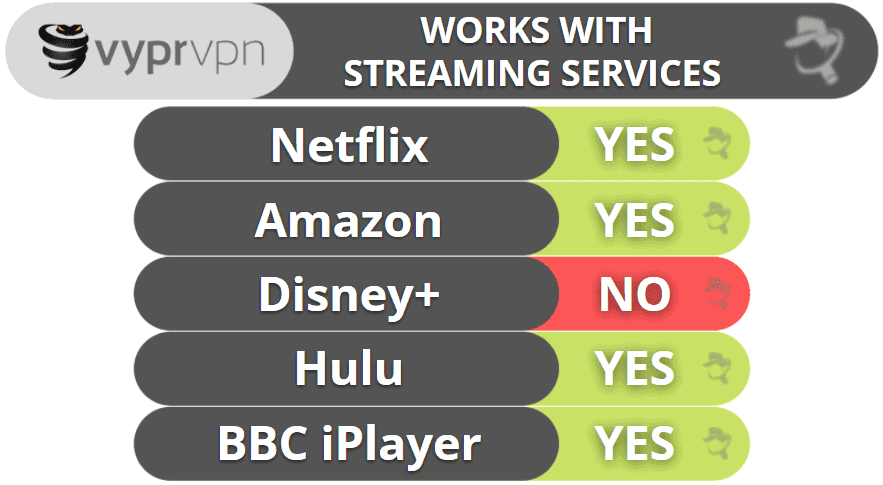
VyprVPN works with Netflix, Hulu, Amazon Prime, Max, BBC iPlayer, and ESPN+. But if you’re a big fan of Disney and Marvel titles, you’ll be disappointed to learn that VyprVPN doesn’t work with Disney+. To visit Disney+, I recommend using other top VPNs like ExpressVPN, Private Internet Access, or CyberGhost VPN.
VyprVPN Torrenting: Strong
VyprVPN is a torrent-friendly service that allows P2P file sharing on all of its servers. I had fast speeds and a quick and seamless torrenting experience during my tests. VyprVPN also passed all of the DNS leak tests that I performed with 0 leaks.
VyprVPN Gaming: Mostly Strong
VyprVPN is among the best VPNs for gaming on the market — it consistently provides good ping values on both local and distant servers and also has very fast download speeds (it only took me about 20–22 minutes to download Dota 2, which is around 35 GB of data). Plus, in my tests, I never experienced lag or dropped connections while gaming with VyprVPN.
VyprVPN provides anti-DDoS protection across all of its servers, and it also has router support. It doesn’t mention if it supports cloud gaming — I reached out to customer support, and the reps told me they can’t guarantee VyprVPN will work with platforms like Google Stadia and GeForce Now. I ran tests and VyprVPN worked well for me, but the results might not be the same for you.
VyprVPN Bypassing Network Restrictions: Strong
VyprVPN has a special protocol called Chameleon that keeps your VPN traffic undetectable in restrictive countries. Chameleon also regularly refreshes your IP address during the VPN connection to better protect your privacy and protect you from IP blocks. It’s great for accessing blocked content on restricted networks, too, like at work or school.
VyprVPN Ease of Use
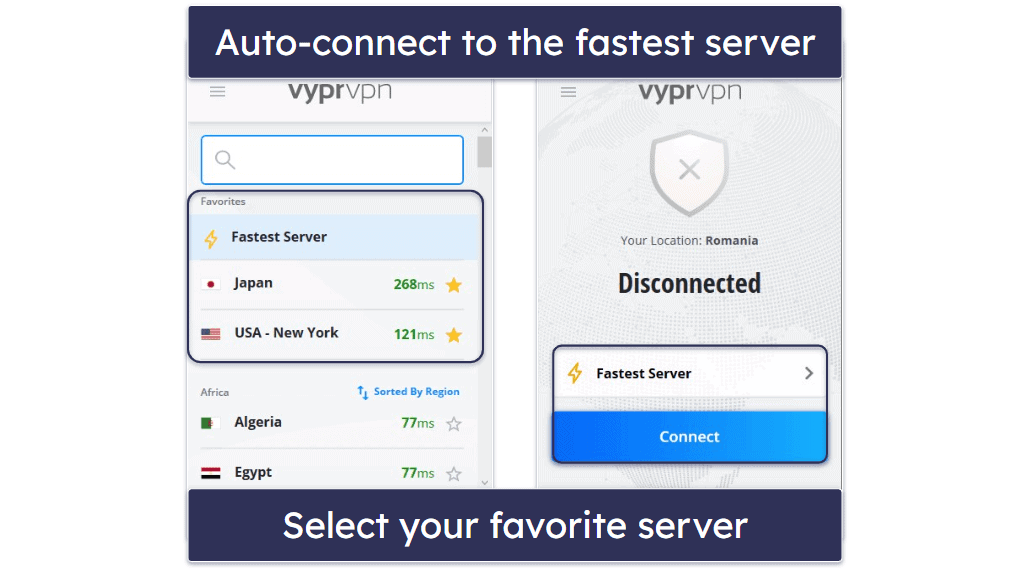
VyprVPN’s interface is very organized. Both the mobile and desktop apps have a 3-tab layout: Customize, Connection, and Servers, which makes it very easy to find what you’re looking for. If you like auto-connection options, VyprVPN has that, too. Its Public Wi-Fi Protection feature allows you to configure the app to automatically connect to a VPN server whenever you connect to an untrusted network.
The settings are available under the Customize tab and all come with clear labels and concise explanations. It didn’t take me more than a couple of seconds to find what I needed and enable/disable it.
The connection options are under Connection. Here, you’ll find the Fastest Server tool and the entire list of locations that you can manually search via the search function. What I really like here is how the ping for all locations is color-coded (just like in Proton VPN’s app), and I think it’s very convenient that VyprVPN lets you sort servers by speed, region, and country.
VyprVPN Plans + Pricing
VyprVPN’s subscription prices start at $3.00 / month. You can pay by credit card, UnionPay, or PayPal (but not with cryptocurrency), and every plan includes a 30-day money-back guarantee.
VyprVPN has a VyprVPN for Business plan and a VyprVPN for Business Cloud plan. Both business plans come with a free trial.
Read the full VyprVPN review >
10. IPVanish — Good for Torrenting

Advanced 24-month: $3.29 / month
IPVanish is pretty good for torrenting. I especially like that all of its servers support P2P traffic and that it works with top torrenting apps like uTorrent and Vuze. IPVanish also has SOCKS5 servers in 14 countries, which provide faster downloads than VPN servers because they don’t use encryption (but they still change your IP address).
- Double Hop servers
- Good ad & tracker blocker
- SOCKS proxy servers for torrenting
- Can’t access Disney+
- Doesn’t work in restrictive countries
The provider is also decent for streaming and works with Netflix, though it can’t access as many streaming services as ExpressVPN, Private Internet Access, and CyberGhost VPN.
It has user-friendly apps for all major platforms, and I really like how the VPN supports unlimited connections. It also provides good security, including advanced security features like perfect forward secrecy.

IPVanish Security Facts
- Protocols: WireGuard, IKEv2, OpenVPN, and IPSec
- Data encryption: 256-bit AES
- Specialty servers: Split-tunneling, SOCKS5
- Leak protection: DNS, IPv6
- Kill switch: Yes
- No-logs policy: Yes
- RAM-only servers: No
- Perfect forward secrecy: Yes
IPVanish Speed Tests
IPVanish has servers in 112 countries. I like that IPVanish gives you metrics such as the load and ping of every server because it makes it easy to find the fastest servers. To test IPVanish’s speed, we connected to a server with the lowest load in multiple countries.
Here are some highlights:
Throughout our speed tests, we maintained above-average speeds. The speed decreased by about an average of only 33% — this is comparable to top competitors like CyberGhost. So, if you’re looking for a VPN with good speeds, IPVanish is a pretty decent choice.
IPVanish Streaming: Mostly Strong
IPVanish works with some popular streaming services, like Netflix and Amazon Prime, as well as sites like BBC iPlayer and Channel 4, but it can’t access Disney+. There are many other VPNs on this list (like ExpressVPN, Private Internet Access, and CyberGhost VPN) that are much better for streaming.

IPVanish Torrenting: Strong
All of IPVanish’s servers are P2P-friendly, and it also has SOCKS5 proxy servers that provide even faster downloads because they don’t encrypt your data — I ran tests and usually had 10% faster download speeds when using the SOCKS5 proxy servers.
IPVanish Gaming: Strong
IPVanish is really good for gaming. I spent a few hours playing Fortnite and Dota 2 using both a local and a distant server, and I always maintained good ping values — so I never experienced stuttering, freezes, lag, or dropped connections while gaming.
With IPVanish, you get anti-DDoS protection on all servers, and you can also manually set up the VPN on your router to use it while gaming on your PlayStation console or Nintendo Switch.
And I like that IPVanish supports cloud gaming, just like ExpressVPN — I had no problem using this VPN to play my favorite games on platforms like Google Stadia and GeForce Now.
IPVanish Bypassing Network Restrictions: Weak
Unfortunately, IPVanish doesn’t work in restrictive countries — only on restricted networks (like at work and school). If you’re looking for a VPN that is able to get around firewalls, consider using Private Internet Access.
IPVanish Ease of Use

IPVanish’s apps are easy to use. You get an Optimal Location feature to connect you to the fastest server, and it’s super easy to manually connect to any of its other server locations — the app sorts all servers alphabetically by ping, city, and country, so it doesn’t take more than a couple of seconds to find and connect to your preferred server.
On desktop, there’s an interactive map, similar to NordVPN, Proton VPN, and TunnelBear, which shows how many servers IPVanish has in each country and location, and you can just click on your desired country to connect in mere seconds. If you prefer the list, all you have to do is click on the List option.
The settings have a very simple layout, and there aren’t too many of them, so the menu is easy to navigate. Plus, each comes with a short description, which helped me understand when it’s a good idea to enable or disable each feature.
IPVanish Plans + Pricing
IPVanish offers 2 paid plans, IPVanish Essential and IPVanish Advanced, with subscription options that start at $2.19 / month.
IPVanish Essential includes all of the VPN features, and Advanced adds a Livedriver subscription with 1 TB of cloud storage and backup, plus a secure browser with built-in VPN protection.
IPVanish accepts major credit/debit cards, PayPal, and Google Pay as forms of payment (cryptocurrency is not accepted). You get a 30-day money-back guarantee on the long-term subscriptions.
Read the full IPVanish review >
Quick Comparison Table
Editor's Note: Intego ONE, Private Internet Access, CyberGhost and ExpressVPN are owned by Kape Technologies, our parent company.
Testing Methodology: Comparison & Ranking Criteria
In short, I relied on our tried-and-true testing methodology to make sure every VPN on this list meets our high standards. This involved putting each provider through a variety of real-world tests to evaluate security, privacy, speed, and ease of use. Each VPN listed here met and exceeded our benchmarks and provided significant value beyond what other market options offer. To find the best VPNs on the market, I did the following:
- I looked for advanced security features. I only recommend VPNs that offer industry-standard VPN security features like 256-bit AES encryption, secure VPN protocols (like OpenVPN and WireGuard), a kill switch (which prevents your internet data from getting exposed if your VPN gets disconnected), and leak protection. I also looked for additional features like split-tunneling (which allows you to route some of your traffic through a VPN and some of your traffic through your local connections), an ad-blocker, protection against future quantum threats, and more. Not all of the VPNs on this list have all of these extras, but all of my top picks, like ExpressVPN, Private Internet Access, and CyberGhost VPN, have strong security features.
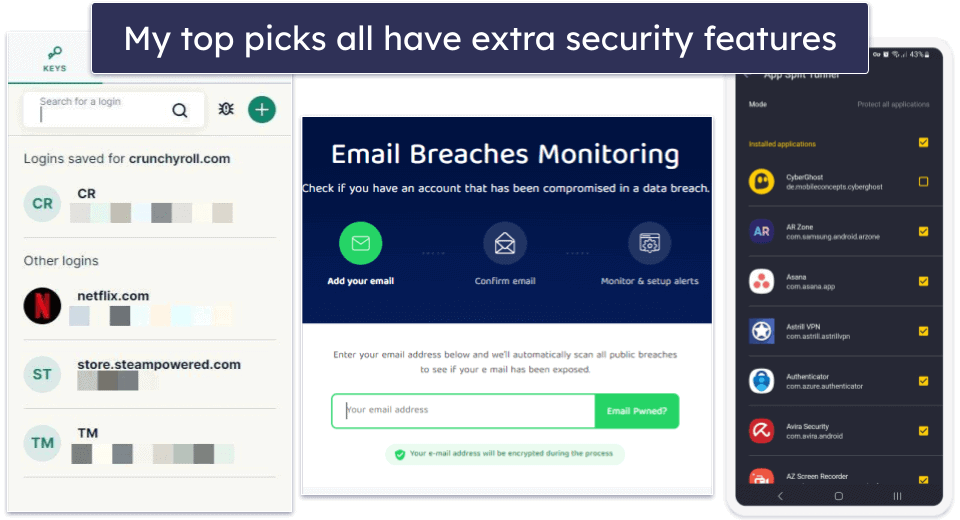
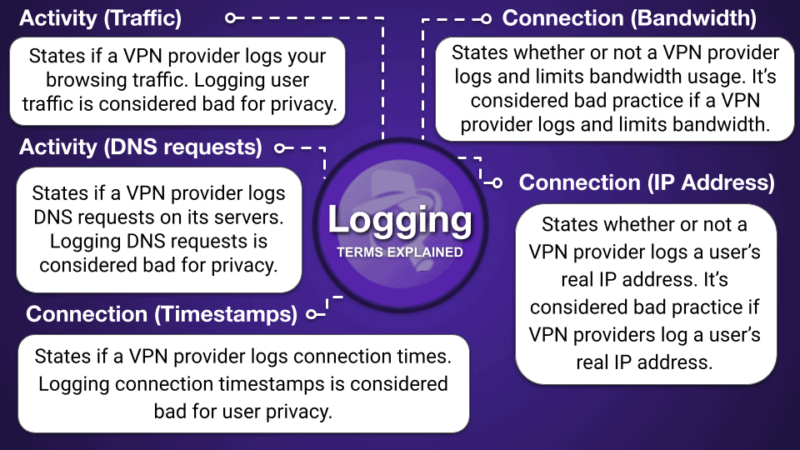
- I ensured each provider has a no-logs policy. This stops a VPN from storing your personal information and internet activity (websites you browse and files you share). All of the VPNs listed here have strict no-logs policies. In addition, most of the VPNs have even had their policies independently audited and confirmed.
- I opted for VPNs with a wide range of servers worldwide. The best VPNs have hundreds or thousands of servers all over the world. More servers in a location usually translate to faster internet connections and reduce the risk of overcrowding on a specific server, resulting in improved speeds.
- I picked VPNs with fast speeds. Every VPN will slow down your internet connection, but the best VPNs will minimize the decrease in speed, even when you connect to distant servers. The VPNs on this list reduced our speed by no more than 50% — the fastest VPNs (like ExpressVPN and Private Internet Access) slowed down the connection by an average of only 15–25%. Even in cases where speeds were considerably decreased, we were able to browse the internet, stream videos, or download files with a fast and stable internet connection with all of the VPNs on this list.
- I checked for streaming, torrenting, and obfuscation capabilities. A good VPN works with top streaming services, allows you to safely share P2P files, and works on restrictive networks and/or countries with the help of obfuscation features. Not all VPNs are good for all online activities, but many of my top VPNs (like ExpressVPN, Private Internet Access, and PrivateVPN) are good options.
- I chose VPN providers that offer an overall great value. All of my choices allow you to connect 7–10 devices at the same time under a single account — and a few (like Private Internet Access, Surfshark, and TunnelBear) even provide unlimited simultaneous connections. Most VPNs offer monthly and yearly subscription plans, flexible payment options (including cryptocurrency), and 30-day money-back guarantees (CyberGhost VPN even has a 45-day money-back guarantee).
How to Pick the Best VPN for Your Operating System
When choosing a VPN, it’s important to consider the quality of its apps for your devices.
While all the listed VPNs offer secure and user-friendly apps for major operating systems, some excel on specific platforms. For instance, a VPN might have an outstanding Windows app but lack essential features on iOS. So, ensure the VPN you select has robust app support for all your intended devices.
I tested the Android, iOS, Windows, and Mac apps for every single VPN on this list. Here are the key aspects to consider for choosing the best VPN for each operating system:
- Best VPNs for Windows. A VPN’s Windows app is typically its most feature-rich and user-friendly app. Windows devices are compatible with many VPN tools, so you want to ensure your VPN comes with the essentials, including an intuitive interface, a kill switch, fast and secure protocols, and split-tunneling. Our top pick for Windows is ExpressVPN.
- Best VPNs for Mac. Mac VPNs usually come with many of the same VPN features as a Windows app, but there are some differences. For example, a lot of Mac VPN apps are missing the fastest protocols, IP leak protection, and split-tunneling. My favorite Mac apps are Proton VPN and Private Internet Access.
- Best VPNs for Android. There are many VPN Android apps that simply don’t work, don’t have a lot of features, or have confusing designs, making it difficult to use your VPN on the go. Thankfully, top VPNs like ExpressVPN and Private Internet Access include an Android app that’s super easy to navigate and doesn’t have any bugs.
- Best VPNs for iOS. It’s common for VPN iOS apps to offer the fewest features out of all of the top operating systems due to restrictions Apple places on its mobile devices. Still, there are a handful of really good iOS VPN apps that include rare iOS features like a kill switch and a malware blocker. We rank ExpressVPN, CyberGhost, and NordVPN as the best iOS apps.
What Can I Use My VPN For?
- Stronger security on public Wi-Fi. Public Wi-Fi networks are full of security risks, making it easy for hackers to intercept your data. A VPN encrypts your internet traffic, ensuring your personal information, passwords, and banking details stay protected.
- Bypass network restrictions. Some networks block access to certain websites, messaging apps, or social media platforms. A VPN helps you bypass these restrictions by masking your IP, allowing access to the free and open internet.
- Streaming securely in good quality. A VPN lets you securely watch your favorite shows, movies, and live sports from anywhere.
- Private & secure torrenting. When torrenting, your IP address is visible to other users, which can expose you to security risks and legal concerns. A VPN hides your real IP address and encrypts your traffic, keeping your torrenting activity private and secure.
- Better gaming experience. A VPN helps protect against DDoS attacks, reduces the risk of IP bans, and can even improve your connection to certain game servers.
- Avoid bandwidth throttling. Some internet service providers slow down your connection when they detect high-bandwidth activities like streaming, gaming, or torrenting. A VPN prevents your ISP from monitoring your activity, helping you maintain fast and consistent speeds.
- Safer online transactions. Whether you’re making online payments, trading cryptocurrency, or handling sensitive data, a VPN adds an extra layer of security by encrypting your connection and protecting your data from cyber threats.
- Fairer prices when shopping & traveling. Websites often change prices based on your location, browsing history, or even the device you’re using. A VPN lets you compare prices from different regions, helping you find better deals on flights, hotels, and online purchases.
- More private browsing. Websites, search engines, and advertisers track your browsing habits to serve targeted ads and even adjust prices. A VPN helps prevent this tracking, ensuring a more private and ad-free browsing experience.
- Protection from government & ISP surveillance. In some regions, governments and ISPs monitor internet activity. A VPN encrypts your traffic, keeping your online activities private and allowing you to browse freely without restrictions.
Top Brands that Didn’t Make the Cut:
- Hotspot Shield. Hotspot Shield is a good VPN for streaming and torrenting, with fast speeds and a big server network. However, it’s missing certain key security features, IPv6 and WebRTC leak protection only work on Windows, and it doesn’t work reliably in restrictive countries like China. Overall, it doesn’t provide as good a value as the VPNs on this list.
- HMA VPN. HMA VPN is secure, has good speeds, and supports torrenting on dedicated P2P servers and works with popular streaming sites. However, HMA VPN doesn’t work in restrictive countries, its customer support is terrible, and it’s very expensive.
- Mullvad VPN. Mullvad VPN has impressive security and privacy features, maintains pretty fast speeds, and works in restrictive countries. One of Mullvad VPN’s biggest drawbacks is that it doesn’t work with a lot of streaming services.
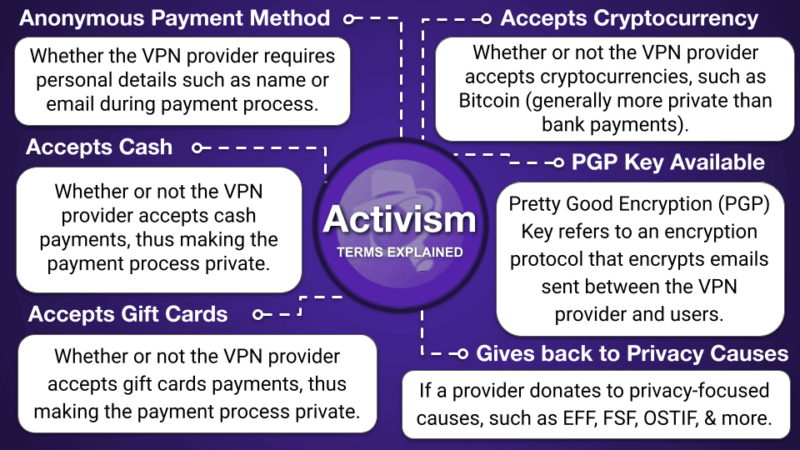
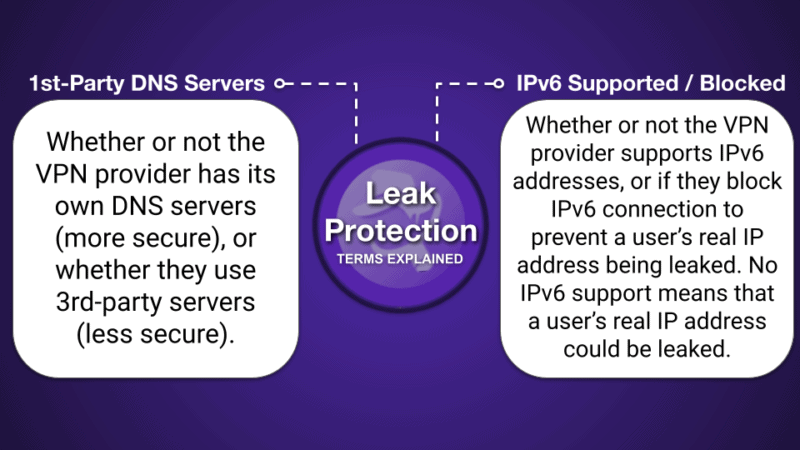
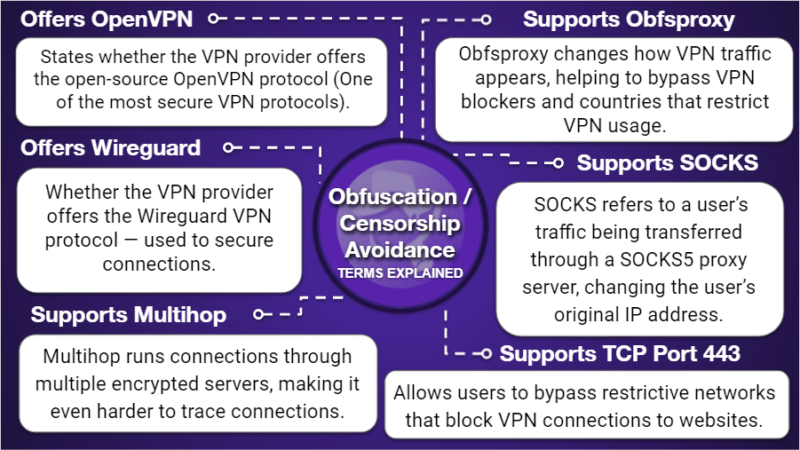
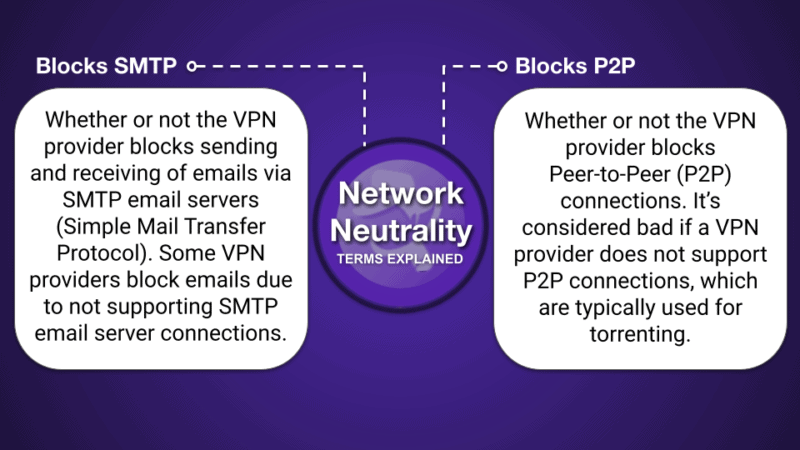
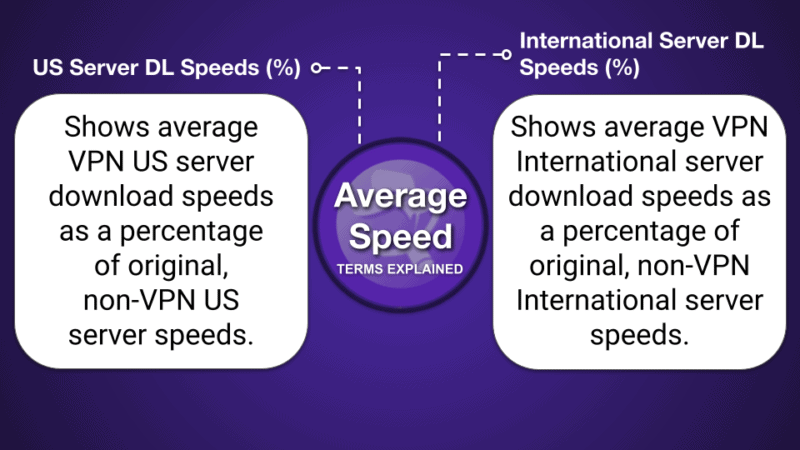
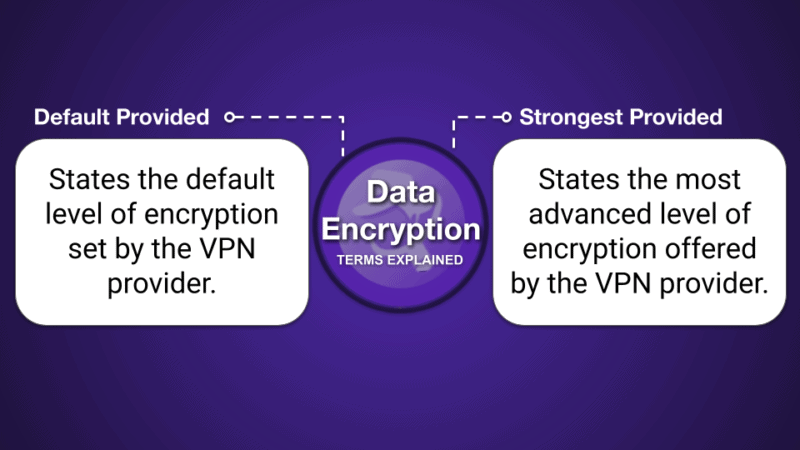
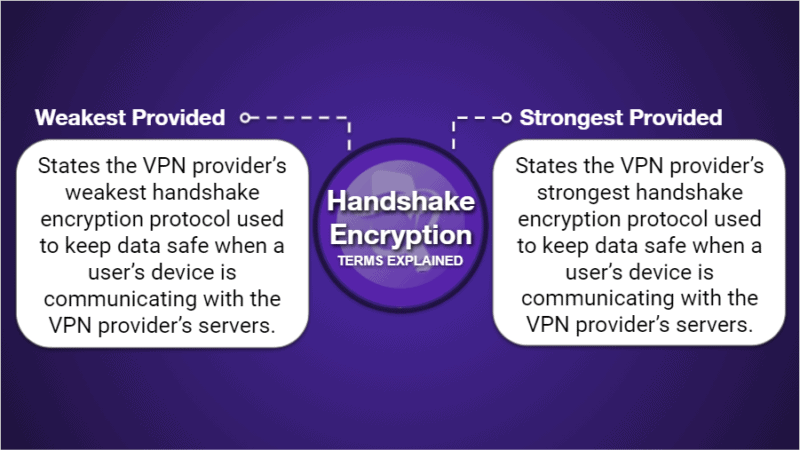
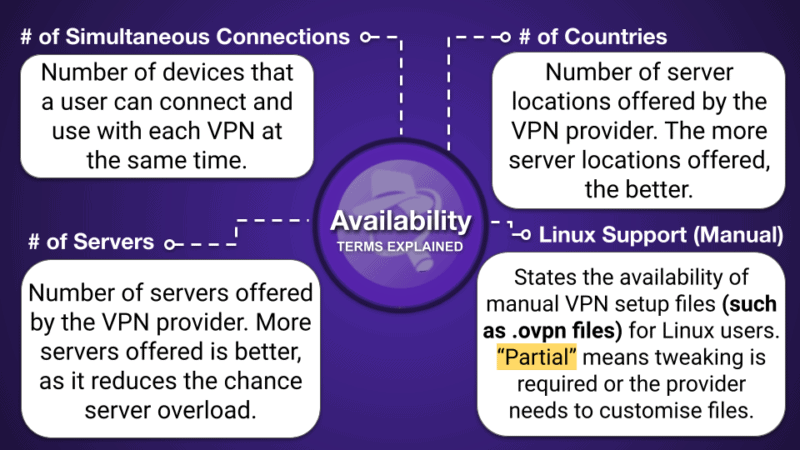
VPN Infographic
Frequently Asked Questions
What’s the best VPN in 2026?
ExpressVPN is my #1 pick for the best VPN in 2026. It has a large network of fast servers, is very easy to use, and has excellent security features (its own DNS encryption service, TrustedServer technology, and its own ultra-fast, secure protocol Lightway). It maintains user privacy with a strict no-logs policy, allows users to pay with crypto, and all of its servers run on RAM (not hard drives), so your browsing history is never recorded. It allows you to stream in HD on all major streaming sites, it supports P2P traffic on all of its servers, and it successfully bypasses network restrictions. You can connect up to 14 devices at once, and ExpressVPN is backed by a 30-day money-back guarantee.
Are VPNs legal?
VPNs are legal in most countries around the world. However, a few countries have banned VPNs or don’t allow the use of VPNs to access censored content, including China, Iran, Russia, Iraq, Belarus, North Korea, the United Arab Emirates, and Venezuela. If you are using a VPN in a country that doesn’t allow VPNs, you may be breaking the law. And if caught, you may be prosecuted.
If you plan to live in or visit a country that restricts user content, you should buy a VPN now because you may be unable to access the VPN’s website from inside that country.
In countries where VPNs are legal, it is illegal to use a VPN to engage in criminal activity. As long as you follow all local laws, a VPN is a perfectly safe and legal tool to add security, privacy, and versatility to your online experience.
How does a VPN protect you on the internet?
A VPN protects you in two ways. The most basic way is by routing your internet traffic through one of its own servers — instead of through your local network or a public Wi-Fi hotspot — thereby masking where your traffic comes from.
VPNs also encrypt all of this traffic in a tunnel, obscuring all of your browsing content. VPNs help secure your browsing data against third-party observers like hackers. All of the VPNs on this list are capable of doing this.
Are VPNs safe?
Yes, good VPNs have tons of different security features that protect your data and privacy. All of the top VPNs in 2026 come with industry-standard VPN security features like 256-bit AES encryption (the same encryption used by banks and militaries), a kill switch (automatically disconnects you from the internet if your VPN connection drops to prevent data leaks), protection against DNS, WebRTC, and IPv6 leaks, and a strict no-logs policy (to prevent the VPN from recording the websites you visit and files you download). And some VPNs like ExpressVPN and NordVPN have even conducted independent audits to verify their no-logs policies, while others like Private Internet Access and CyberGhost VPN also issue transparency reports to prove they don’t store or share user data.
Most quality VPNs also include advanced security features like RAM-only servers (data is never stored on the hard drive) and perfect forward secrecy (changes your encryption key to prevent future and past keys from being hacked), and come with cool extras like malware blockers and split-tunneling.
How much does a VPN cost?
A VPN subscription can cost you as little as $2 per month or as much as $15 per month, depending on which plan you choose. The longer-term plans (1-, 2-, and 3-year plans) offer the best value and are typically the cheapest ones, while the monthly plans are priced higher.
For example, Private Internet Access has one of the cheapest deals out there — its 1-month price is a little steep (though still comparable to other top VPNs), but its long-term offer is very budget-friendly at $1.33 / month. ExpressVPN’s prices, which start at $2.49 / month, are a bit higher than average, but it offers exceptional value and the long-term deal usually includes additional months for free. If you’re looking for the best low-cost VPNs on the market, check out our top picks here.
Is it worth paying for a VPN?
Yes, 100% if you want to be extra cautious and want to protect your online data. The top VPNs offer great security, privacy, and value at a reasonable price. My favorite VPNs in 2026 are ExpressVPN and Private Internet Access, which are both secure, fast, work with all of the top streaming services (including Netflix), allow torrenting, have easy-to-use apps for nearly every device that has an internet connection, and offer competitive pricing.
Another option you have is to get a free VPN, but I really don’t recommend it. Most free VPN plans set a limit on how much data you can use each day or month, throttle your speeds, limit the number of servers and countries you can access, may interrupt your browsing with ads, or even sell your online data (website you visit and products you purchase) to third parties for advertising purposes.
How do I know if my VPN is working?
You can check if your VPN is working by using an online IP address checker (like ipleak.net). If the IP address displayed on the website is different from your actual location, then your VPN is working correctly. You can also check the VPN’s status on your mobile or desktop app. Make sure it says “Connected”.
I tested all of the VPNs on this list for leaks, and I never experienced any. So they all work as intended.
How to reduce the cost of a VPN?
To reduce the cost of a VPN, you should choose a long-term deal instead of a shorter plan. Usually, VPNs offer significant discounts for their annual offers compared to their monthly subscriptions.
Additionally, keep an eye out for promotional deals or coupon codes that can help you save money when signing up for a VPN service. The easiest way to find the best VPN deals is to bookmark and regularly check this page.
Will a VPN make me anonymous online?
VPNs protect your privacy and secure your data, but they don’t make you 100% anonymous. A VPN encrypts your internet traffic and changes your IP address, making it difficult for others to track your online activities and location. However, a VPN can’t prevent sites from collecting all of your data — for instance, it can’t stop social media sites from collecting any personal data you make public on them.
Does a VPN increase speeds?
VPNs don’t necessarily increase your speeds. In fact, VPNs typically slow down your connections because they encrypt your traffic, which takes time, and because your connection has to travel extra to get routed through the VPN server before it reaches its final destination.
However, if your ISP throttles your speeds because of bandwidth-heavy activities, like streaming or gaming, connecting to a VPN will give you a boost.
That said, the top VPNs I recommend will have a pretty minimal impact on your speeds. They all offer fast speeds so you won’t even notice you’re connected to a VPN. In our tests, ExpressVPN was the fastest.
Editor's Note: Intego ONE, Private Internet Access, CyberGhost and ExpressVPN are owned by Kape Technologies, our parent company.